Showing posts with label blogger. Show all posts

Wednesday, August 19, 2026

The return of the visitor map!

I've been using counters for visits and pageviews for the last 20 years. I like quick information - but I also want indepth information.

A Quick Look - on the blog

For many years, I have used clustrmaps.com to provide a visual map in my side column of where visitors to my blog come from.

I've always been completely amazed that I can sit typing at home in East London and the words that get published on my blog get read by people living all over the world - literally on every continent (bar Antarctica).

However, very sadly Clustrmaps has died.

Hence I was very pleased today to find a product which seeks to replicate it. Indeed I think it might even be the same team with a different name as they seem to have the same ethos - which is one I like and very much approve of.
Map My Visitors was created by a small team — just three guys working together. We are passionate about making web analytics accessible to everyone. We understand that tracking website traffic is essential for businesses, bloggers, and individuals, but the cost and complexity of existing solutions can be extremely overwhelming. That's why we set out on a mission to create a hit counter service that is not only accurate, fast, and responsive but also user-friendly and affordable.

Introducing MapMyVistors

MapMyVisitors


MapMyVisitors has a real time visitor map widget - and produces 
  • either a map of where all your visitors come from (unless they are blocking their location)
  • or a Globe widget (which moves!) I'm not a fan of things which move!
Visitors are either a red dot ie past visitors) or an amber or green dot ie visited recently

You can see the map near the top of the right hand side column.

Today - with just a few hours of stats on it, it looks like this

ON MY BLOG - as a widget

MapMyVisitors widget - after a few hours
MapMyVisitors Widget
This is an enlarged version of the widget in the side column
after a few hours (i.e. installed on 19th August)

ON MY DASHBOARD

MapMyVisitors: This is the map on my screen re the dashboard.
Below it lists all the various locations

Statcounter

I cannot remember when I first started using Statcounter - but my stats suggest it must have been nearly 20 years ago.

I also use Statcounter to provide an incredibly detailed map - which allows me to drill down to region and city and ISP - and allowed me to identify I was being absolutely hammered by visits from people in South East Asia earlier this year when my stats went totally wild for two weeks.

This is today's map for the last 7 days

Statcounter: Visitor Map for the last 7 days
- with lots of the countries labelled

HOWEVER they don't have a nice widget sized one for my blog which I can look at really easily - hence my use of MapMyVisitors

Thursday, September 04, 2025

24 Million Pageviews for Making A Mark

I've been writing this blog for very nearly 20 years having started after I took early retirement. 

In December 2005 I started to work out how it all worked with four posts. This was the second 

from Two of my favourite occupations

and  as you can see I hadn't yet mastered how to get a graphite drawing not look overly grey!

Red Onion
from Working Smaller
I then went public at the beginning of January 2006 with these first three posts

and started to focus on producing small works, thinking I might eventually sell them....

I'm used to Blogger which is why I stick with it - and its archive (see below) although I have been tempted by Substack.

I have a 71st birthday coming up soon and I now write an awful lot less than I did in that first year when I aimed for a post each day and actually wrote 348 blog posts. 

Basically osteoarthritis limits gadding about now but also requires regular longish walks - which in turn limits time for blogging. However I now aim to do as much gadding about as I can before I creak too much - and have had a wonderful hot summer visiting various gardens across London and the southeast! So blogging comes second to filling my eyes with things I like to see - whether it's art exhibitions or plants, gardens and walks.

You can read any of my past posts by browsing the blog archive (see links below and in the side column in the desktop/tablet view) - which probably helps explain how come I've now had 24 million pageviews for Making A Mark!!! i.e. more than a million pageviews a year for every year this blog has been published!

Many posts are what might be called "perennials" and worth a second or third look! People have been known to get lost in my archives for hours at a time.....

Browse the Blog Archive


Tuesday, January 07, 2025

Making A Mark is 19 years old today!

 Making A Mark was born in December 2005 but first went public on January 7th 2006

Which makes it 19 years old today. 

The actual first post Making a Mark said

This is a new journal which will reflect on how my paintings and drawings are created.

It will also introduce small works of art which will be available for sale from my website from the New Year.

That was the idea at the time - but was soon revised! I subsequently decided it was probably a better idea to learn more about art - and my Making A Mark blog started to transform.

In December 2005, I started learning how to use Blogger (in private!) and so, that first post was followed in December, by a few which became much more typical of what I used to post at the beginning.

Drinking tea and drawing people - in the RA Friends Room
(Who remembers the big black chesterfield sofas?)
drinking tea and drawing people became a perennial theme for sketches
- which subsequently transferred to another blog
Travels with my Sketchbook in....

Drinking tea and drawing people at the RI Exhibition at the Mall Galleries (2010)
on Travels with a Sketchbook in....
This sketch subsequently appeared on page 103 of my book Sketching 365
I can even remember that those blue paintings on the back wall
were by Bob Rudd
Sadly this blog was knobbled by my growing mobility issues


However, in terms of birthdays, I always count the day it first went public as it's actual birthday. Making A Mark went public to the world at large after I'd recovered from flu and got through Christmas 2005.   

So the actual FIRST PUBLIC POST was Catnapping on January 5th 2006.

Catnapping #2
Cosmo sleeping on the lap of JR (he loved his Daddy!)

I've been pondering about whether I've opted for the right blogger software and whether, if I need to change, I need to do it sooner rather than later. But every time I look at all the alternatives I get a headache. And as the flu bug has only diminished rather than disappeared I think I'll leave that for when I'm feeling a bit more invigorated and generally up for a bit of cyber thingummies. Especially as I've just managed to lose all my refinements of the basic template because I fancied looking at what it looked like in blue! Grrrrrrr!!
What I now value very much is I have a complete record of a lot of my life over the last 19 years - where I've been, what I've seen, who I've met and all the art along the way. If I get bored or cannot get out I just start to look through my archives in the side column - year by year and month by month. 

In the lead up to Making A Mark's 20th birthday, I think I might start regular reminders of posts from the past - because they're useful or a visual feast.

Then there's all my photographs of art and exhibitions........

Tuesday, September 05, 2023

20 million pageviews!!

Making A Mark has finally achieved 20 million pageviews - as counted by Blogger!

It also recently made it to six million unique visits as well.

125k+ Visitors from all over the world in the last 6 months

I feel so silly though as I knew it was coming up - but took my eye off the ball so I don't know when it happened but it was in the last few days!

Despite me writing a lot less now (only 106 posts so far this year!) - for reasons I explained in my last post - it's still generating a lot of visits from all over the world - and most stick around and take a longer look at what else can be found on the blog.

Below are tips for how to get people to visit and to keep coming back....

Making A Mark - the story so far

Blogger hasn't quite adjusted to blogs being as old as mine. This is the chart on the stats page

The story since 2011 (when it was already 5 years old) - when it achieved 1 million visits

Previous posts on this topic include:

I included a tip for how to get visits and visitors who want to look around once they arrive in 11 tips for how to get 1 million website visitors quickly

The 11 Tips (explained in the post) were:
1. Make your website very focused
2. Make every webpage very specific - make it a niche within a niche
3. Make every title very specific in terms of its topic
4. Provide a short summary of what each page contains at the top.
5. Make navigation very easy
6. Have a plan for how your website will develop
7. Use statistics to guide development
8. People look at images and read words - but really they scan both!
9. Write about what you know
10. Refresh and update a website regularly (use a blog)
11. Do link to relevant other websites - and encourage them to link back

Blog posts to date

The Archive tells me that the pattern looks like this - with over 4,400 published blog posts to date.

I started out writing virtually every day - for three years.

Then started having one day a week off. I producing around about 300 posts each year or very nearly 6 blog posts a week. This continued (apart from when I was on holiday) until I started to write my book in 2014.

Saturday, July 22, 2023

BLOGGER Archive Albums are STILL available

I must confess when I was writing GOOGLE BLOGGER: Album Archive no longer available after 19 July 2023 I couldn't quite work out how Blogger was going to keep images on Blogger Blog live unless they had an ACTIVE ARCHIVE somewhere.

It used to be part of Google Archive - but we were told Google Archive was going away - and now has (see image at the bottom of this post). In effect the old user interface was deleted - but not the albums.

THE GOOD NEWS is that, although the old Google Archive interface disappeared last week, the BLOGGER ALBUMS ARE STILL AVAILABLE!

The URL is https://www.blogger.com/mediamanager/albums - which I assume is the same for everybody and brings up your albums when you are signed in.

I have absolutely no idea how you find this URL independently. So for those of you who want to keep their access to the Blogger Album Archive, I highly recommend you make a note of it.

UPDATE: Google finally got round to communicating more effectively and explains where images are now - and how to find them in Google Album Archive changes and What will happen to blog photos now that Album Archive is going away?

A selection of my early Blogger Archive Albums - which used to be limited to 500 pics.

My last album for Making A Mark was ENORMOUS - with 6,602 items to date - and that just would not download.

However I tried Takeout and that did finally download ALL albums - in named and dated albums - in an absolutely enormous archive zip file. However it took ages (DAYS!) to appear - and I very nearly missed the email!

I have however been spending a the last few days reviewing the 6,602 images in the last Making A Mark folder and downloading ones I want to make sure I still have. That was some journey down memory lane! 

One of the reason I like the albums is that, for me - being a regular blogger for many, many years - it's rather like walking back through my life!

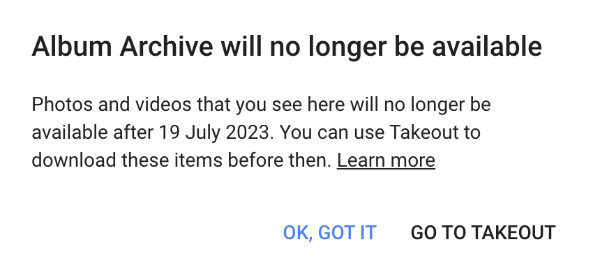
The message left on the Google Album Archive Page
after the web gallery was discontinued


Monday, June 19, 2023

GOOGLE BLOGGER: Album Archive no longer available after 19 July 2023

This is IMPORTANT for all those users of Google Blogger who would like to download their images.

For those using Blogger, you may be aware that all the images you have uploaded to Blogger over time are available in something called Google Archive.

The link to Google Archive for your Google Account is https://get.google.com/albumarchive/ plus a long number which relates to the Google Account you use.

However Google Archive is going away.

Technology giant Google has announced that it is shutting down its Album Archive feature. It will no longer be available to Google users starting July 19, 2023. For those unaware, Album Archive feature allows users to view and manage content from different Google products

So if you want to access easily all the images you have uploaded to your Blogger Blog or other Google Products in the past, you need to download them

For me, some of the images are on old computers which I blew up through overuse(!), so the archive is important to me to remind me what exists in photography or paper form.

How to download your images from Google Archive

You can do this in one of two ways

If you've previously accessed Google Archive, Google knows and will have sent you an email about what to do. 

Basically, in the email Google explains how it wants you to use a function called Google Takeout

  • this is a bit longwinded - depending on how many images you have stored.
  • you say what you want done with your images
  • then Google downloads them - but this can take a long time - so you then have to watch out for the email which says they can now be accessed.
  • BUT whether you get what you want is debatable!
I can tell you what what you get this route is NOT necessarily the same as all the images in your Google Archive i.e. what happened to me

However if you go to the Blogger Album bit of your archive, you can also access past album stores of images and download them direct to your hard drive. 

THIS IS WHAT YOU HAVE TO DO TO DOWNLOAD YOUR IMAGES
  • go to the three vertical dots top right corner of the view of your images in the archive
  • click download the album
  • you will then get a file of all your images.
how to download images from Blogger Album Archive


You have until 19 July 2023 to download your pics.


Sketches from 2011 in the Blogger Album for my Sketchbook blog

This is what I did a while back when I realised that Google was at some point going to get rid of access to the Archive.

I'm now checking to make sure I've accessed and downloaded everything I want to.

The big question for me is if they get rid of the archive what happens to all the images on my blog going back 18 years? 

Will they still load?

Thursday, May 25, 2023

Blogger problem - unable to upload pictures

I'm afraid I cannot write any blog posts involving images at the moment. 

Google has made a change to its software which is preventing me from uploading images to blog posts.

It's an appalling situation in Google's Chrome. This is the message I get while signed in

It's slightly better in Apple's Safari browser - which is where I found out that they want me to accept all Google Cookies so they can track all my activity.

The latter is illegal in the UK - Google should really mug up on GDPR - it's been around for quite a time (see General Data Protection Regulation ​for Artists and Art Organisations)

I suspect the change has been due to the enormous fine Meta has just received - see Meta: Facebook owner fined €1.2bn for mishandling data | BBC

Facebook's owner, Meta, has been fined €1.2bn (£1bn) for mishandling people's data when transferring it between Europe and the United States.

Issued by Ireland's Data Protection Commission (DPC), it is the largest fine imposed under the EU's General Data Protection Regulation privacy law.
I suspect Google has changed things so they can say "we all agreed to all the cookies" - EXCEPT they obviously don't understand that in the UK we have a legal entitlement to refuse all but essential cookies i.e. they cannot make us accept all cookies!

Looks like Google is setting itself up to get a big fine too!

Sunday, May 16, 2021

What next for Feedburner email subscriptions?

On April 14, 2021, Google announced that Feedburner would be losing its email subscription service. Which means that my regular email to those who have subscribed with the latest blog post title and the first 200 characters of the blog post will be no more....

If you’d like to continue using email subscriptions after the June transition, we recommend downloading email subscriber data so that you can migrate your subscribers to a new email subscription service. This data will also be available for download after the transition.

I'm absolutely sure I'm not the only regular Blogger and Feedburner user wondering what to do about a replacement.

[Note: Apparently Google intends to remove all non-core functionality and make it maintenance only - which conflicts with what they're saying re. the removal of the email subscriptions - because that's the only reason I used it - that and the fact it's free!]

Feedburner email subscriptions stop in July 2021

Switching to an alternative for Feedburner email subscriptions

What I want to do is migrate to a Feedburner alternative which

  • Provides me with a free service (like Feedburner)
  • Allows me to import all existing validated emails from Feedburner
  • Allows a subscription for RSS Feed to email subscription option (i.e. replace what I've got at present)
  • Works with all existing RSS services (like Feedburner) - for those who like to read blogs in Feedreaders (like Blogger's Reading List)
  • Gives me some basic statistics. (I have other services which provide me with in-depth stats. All Feedburner tells me is how many subscribers opened the emails).

I'm still trying to work out what to do about the imminent (in July) demise of the Feedburner email to all those who have subscrived to date. 

I've actually got so many subscribers that it very definitely makes some alternatives rather expensive - and I'm running a blog NOT a business!

Some Issues


Email marketing is targeting ecommerce not blogger

Most of the email subscription marketing options are set up to provide an "occasional newsletter / marketing via email" facility for those who have websites and want to communicate with their followers from time to time

i.e. they're set up for ecommerce operations and not for bloggers

You know when you're dealing with one of these when:

  • EITHER there's a limit on 
    • the number of subscribers
    • the number of feeds
    • the number of emails you can send in a month
  • OR you have to pay a charge - - which can mount up - to enable you to carry on as at present.

Another thing - not everybody opens their email

Why should I pay for people who do not open their emails?

As we well know, people are apt to sign up for email subscriptions - and then don't bother validating them and/or reading the emails. I certainly do NOT want to pay for a service which is charging me for those who have subscribed but do not bother to open their emails.

For me this is all the more reason to find a good quality basic service - or a very cheap one.

One more thing - migrate or sign up again?

I could migrate all current subscribers - BUT..... there's a bit of me which would quite like to get people to sign up all over again. That way I will know what the number of 'real subscribers" are.

Or maybe I should just use Twitter more to signal new posts

I already announce everyone via my FB Page....


Possible contenders

Below I tell you about my favourite option(s) to date 

There's also a summary of some Feedburner Email Subscription Alternatives - plus a link to a post which includes a very useful tabulation to help you decide.

Tuesday, November 10, 2020

Reporting copyright infringement & impersonation to Google - MAJOR FAIL

For all those who wonder what happens when you report the infringement of copyright or impersonation of your website or blog to Google.....

  • The good news - Google reviewed my report
  • The bad news - Google has not done what it told me it had done

In short:

  • Earlier this year I found a blog which had lifted my blog posts wholesale - and then changed some of the words - and decorated the blog with Google Adsense adverts
  • I reported it to Google in April - but heard nothing
  • I reported it again in September with a LOT more detail. To do a report you file a formal copyright infringement report - providing a lot of detail
    • see https://support.google.com/legal/troubleshooter/1114905
    • see https://support.google.com/legal/troubleshooter/1114905#ts=1115645 (re infringement via Blogger)
  • you wait for a long time 
    • My first report was ignored. 
    • My second report was filed on 14 September; 
    • I received an email from the Google Blogger Support Team today (9th November 2020)
  • you get an email saying they agree with you - and the blog is now suspended and will no longer be viewable
  • you check the URL of the offending blog - and FIND THE BLOG STILL EXISTS!!
  • you email the Google Blogger Support Team saying you are very unimpressed and are now writing a blog post about it
  • you email the Google Blogger Support Team saying you want to pursue the money paid to the blogger who impersonated by blog

GOOGLE FAIL

Bottom line what looks good on the surface does not deliver in reality
We take inappropriate content seriously
If you see content on a Google product that you believe violates the law or your rights, let us know. We’ll review the material and consider blocking, limiting or removing access to it. Behaviours like phishing, violence or explicit content may also violate our product policies and qualify for removal from Google products. Before creating a request, try to flag the content in the relevant product.
In visual terms this is what the process looks like.......

Friday, August 28, 2020

NEW BLOGGER: Legacy Blogger goes away in September (Take #2)

I inadvertently deleted my blog post - this is Take #2!

This is an update - with the pros and cons of where we are up to in the change to NEW Blogger. It's also relevant to all those who read my last post in June on the change to NEW BLOGGER: Google's NEW Blogger interface does not work properly! 

In short I'm now using NEW Blogger for nearly everything - BUT
  • some major omissions have still not been remedied
  • Legacy Blogger is now scheduled to disappear in September!

I managed to accidentally delete the post before Google had cached it so this is the new shorthand version

Communication has improved 

Although only if you know where the Blogger Help Community is to find it!  

There has been NO UP DATE ON THE GOOGLE BLOGGER BLOG SINCE MAY! Despite several changes in the date the Legacy Option is going be terminated.

These are summary posts about changes made to date. There have in fact been more - which for some reason they've not recorded. 

Update on my last blog post


1. IMPOSSIBLE to upload images from my computer

Then - nobody could upload an image

NOW - uploading an image works but is a bit confusing as to which icon means what in terms of adjusting the image.

Those uploading lots or uploading images bigger than the pixel width of their blog post still seem to be having some problems. I suspect they need to change the dimensions and file size of their images.

2. IMPOSSIBLE to upload videos properly

Wednesday, June 24, 2020

Google's NEW Blogger interface does not work properly!

The tech people at Google may be regretting the notion of revamping Blogger.  Below I'm itemising the problems I've encountered. There may be more!

If you are an ordinary reader please excuse the VITRIOL - which is included in the hope that somebody from Google Blogger might read it!!

Below are two main faults 

  • poorly managed change process
  • very poor communication and very poor design
plus a section why the new interface is dysfunctional - which contains 
  • 10 points explaining what is wrong with the NEW BLOGGER interface


Poorly managed change process


It's a big mistake to change what works - without
  • a very good reason and 
  • a very good team to deliver that change 
  • a very good communication system for communicating the change
It's an even bigger mistake to announce - with a month to go - that 
  • a new interface is to become the default in a month's time 
  • WHEN IT DOES NOT WORK
That was the situation in May. We're now reaching the end of June and it would appear that 
  • the new Blogger is now the default
  • BUT somebody in Google Blogger has seen sense and the message saying that the system would remove the Legacy Blogger has been removed.
They better not remove Legacy Blogger because the system STILL does not work properly - and this post is being written in Legacy Blogger to preserve my sanity and keep my hypertension in check!

Very poor communication and very poor design


It's an even bigger mistake to be appalling at communicating about change - but that is what Google has succeeded in doing
Obviously Fontaine - who wrote the blog post - has had no training in communication because s/he/it LEFT OUT the critical information that Blogger users need to know until the penultimate paragraph (my bold of the critical information which is NOT ON THE DASHBOARD)
  • new interface becomes default in late June
  • Classic Blogger - now called "legacy") will disappear in July
This proposal frankly shows evidence inexperience, lack of awareness and ineptitude in equal measure.

How can you do away with a legacy system when THE NEW ONE DOES NOT WORK!!?
We’ll be moving everyone to the new interface over the coming months. Starting in late June, many Blogger creators will see the new interface become their default, though they can revert to the old interface by clicking “Revert to legacy Blogger” in the left-hand navigation. By late July, creators will no longer be able to revert to the legacy Blogger interface.
  • Plus in May we got a new banner on the dashboard - 
    • a month before the new interface becomes the default. 
    • That's the new interface WHICH DOES NOT WORK.  
    • It forgets to mention that the existing interface will disappear in July - despite the fact they do not have a fully functioning interface and it has NOT been tested with users.
  • BUT there is no HELP Page which explains how the new system works!!!
  • The Google Blogger Help Community - set up for Blogger by Google - is NOT MONITORED BY THE BLOGGER IMPLEMENTATION TEAM!!!!!!!
    • so we have huge numbers of people reporting various problems with the new interface
    • nobody from Google responding to them
    • just one blog post which highlights that they recognise there is a problem with images - but that's the only problem they recognise.
I know a number of my Readers use Blogger for their own blogs - in which case:
  • you will be interested to learn about why the new interface is dysfunctional
  • you may well become as worried as I am about the almighty cock-up already manufactured by Google

Why the new interface is dysfunctional 

Let me count 10 ways it does not work

1. IMPOSSIBLE to upload images from my computer

This is the big one. IT's improved somewhat - but is still not working for everybody.

What was happening is that you click the picture icon and say "I want to upload an image from my computer" and it triggers a large white box with a spinning wheel over a document icon - and momentary notice that it is unable to contacts Google Docs. Given the fact I had no intention of connecting to Google Docs this was very puzzling. It then got extremely boring because the spinning wheel never went away.

The latest is that a picture is uploaded and then does not appear.

So, currently, uploading images very much continues to be a problem for some - particularly those using Safari for a browser.

Saturday, August 11, 2018

Comments are suspended on Making A Mark


I've changed how comments work on Making A Mark i.e. you can't.

This is what the preamble to the comment section on Making A Mark now says.....

COMMENTS HAVE BEEN SUSPENDED

There are lots and lots of very silly people who don't understand that Google is not stupid and that links posted to a Blogger comment are:

  • NOT LIVE and
  • CARRY NO LINK JUICE. 
They continue to post spam comments - despite this blog using both word verification and moderation that states very clearly that no spam will be published.

So I've SUSPENDED COMMENTING BY EVERYBODY but me. This allows past comments to still be seen.
Feel free to comment on my Facebook Page when my blog posts are posted there
BUT but do note: 
Spammers on Facebook will always be blocked and reported to Facebook if  they spam my FB Page.

I'm left wondering if my NEW blog settings for comments  will mean most people wanting to leave a comment won't see the message.

Whatever - it's better than having to get rid of the number of spam comments I have been receiving everyday!

Google is very definitely NOT on top of spam comments and those who leave them and pay for them

Google owns Blogger and needs to get a LOT better at removing those firms which keep sending/paying for the same spam comments - because I keep reporting the spam and the spam keeps on coming - with a significant proportion being from the same people.

If their policy was to BURY every website in the Google Index that is left as an unrelated and spurious link in comments - UNLESS the blog owner approves it - that would be a start.

What would be the point of paying for spam comments if you effectively achieved the reverse of what you, in theory, are trying to achieve?

I think the message might get around pretty fast about that one.....

Monday, July 02, 2018

Will Chrome 68 label your website as "NOT Secure"?

Starting in July 2018, Google's Chrome Browser (Chrome 68) will start labelling all websites which start with HTTP as "Not Secure". (see 

Below is an illustration by Google of what this means.
  • The top line shows what a URL currently looks like in the URL window.
  • Below it is what this will change to when Chrome 68 is introduced 
In Chrome 68, the omnibox will display “Not secure” for all HTTP pages.
My expectation is that the "Not secure" will be really obvious - like this "Not secure"

Now a lot of people thought that this would all happen yesterday 1 July 2018 - because Google said it would happen in July.

They missed the bit that said
Beginning in July 2018 with the release of Chrome 68, Chrome will mark all HTTP sites as “not secure”.
(Chrome 68 has not yet been introduced in the UK - but may have happened elsewhere. I'm on Version 67.0.3396.99 )

Below I look at:
  • what does being labelled as "not secure" mean?
  • what you need to do re. Google's Blogger (I had a hiccup!)
  • How do I make my website/blog/ secure?


What does being labelled "not secure" mean?


The reasons for making your website/blog secure are:
  • it protects the integrity of your website
  • it protects the privacy and security of your visitors and those shopping via your site
  • it's where the web is going. Security is ever increasing and there is a cost to not keeping up with developments in this area.
There are also a number of implications of Google's ongoing drive for better security of all websites
  • Your website may not rank well in response to Google search queries. Google is already downgrading all websites in search which are currently marked as "Your connection to this site is not secure" which is what comes up if you click the "i" icon prefacing the URL
  • Your website or blog traffic may take a dive - as in "off a cliff". It all depends on whether you depend on your email list of Google for visitors to your website or blog.
  • If you are selling art via your website you may notice sales drying up. 
    • Obviously your website MUST also be super secure if you are taking any payment transactions via your website - even if you are routing them via a secure process. 
    • You can't have an insecure website with PayPal or whatever and expect to get away with it!

So what about Google's Blogger?


This is where it gets interesting - then tortuous - then interesting again. Bear with me!