Showing posts with label Techies. Show all posts

Wednesday, October 09, 2024

How to lose your website's domain name

There's a very easy way to lose your Website's presence on the internet AND all its followers.

Just FORGET TO RENEW YOUR DOMAIN NAME

Your website still exists - but nobody can see it. That's all. It's really very, very simple.

I've lost count of the number of artists and art societies / groups / organisations who have fallen foul of thinking somebody else would remember to remind them that the licence for the domain name needs renewal.

This morning I came across another to add to the list.

Things you must remember

  1. You do NOT own your domain name
  2. When you pay for a domain name, you license it for a specific period of time
  3. If you do NOT renew the licence in time you risk losing your website's presence on the internet i.e. your website ceases to exist
  4. If you are unable to re-register the domain name, all the effort you have made to get the domain name recognised is wasted
More VERY IMPORTANT TO BE AVOIDED AT ALL COSTS TIP at the end - and the last two are critical!

Why are domain names important

Domain names provide a unique way of referencing a single unique site on the internet.

Hence they are very precious. They are that important. 

Quite often people buy their domain names before they've even worked out how they are going to build their website.

Speaking personally, I own far more domain names than I do websites. That's because I've got a bunch of them which were bought for defensive reasons i.e. I didn't want anybody else having the name.

How domain names work

Thursday, May 25, 2023

Blogger problem - unable to upload pictures

I'm afraid I cannot write any blog posts involving images at the moment. 

Google has made a change to its software which is preventing me from uploading images to blog posts.

It's an appalling situation in Google's Chrome. This is the message I get while signed in

It's slightly better in Apple's Safari browser - which is where I found out that they want me to accept all Google Cookies so they can track all my activity.

The latter is illegal in the UK - Google should really mug up on GDPR - it's been around for quite a time (see General Data Protection Regulation ​for Artists and Art Organisations)

I suspect the change has been due to the enormous fine Meta has just received - see Meta: Facebook owner fined €1.2bn for mishandling data | BBC

Facebook's owner, Meta, has been fined €1.2bn (£1bn) for mishandling people's data when transferring it between Europe and the United States.

Issued by Ireland's Data Protection Commission (DPC), it is the largest fine imposed under the EU's General Data Protection Regulation privacy law.
I suspect Google has changed things so they can say "we all agreed to all the cookies" - EXCEPT they obviously don't understand that in the UK we have a legal entitlement to refuse all but essential cookies i.e. they cannot make us accept all cookies!

Looks like Google is setting itself up to get a big fine too!

Thursday, September 22, 2022

Do you have a Weebly website?

This post is for owners of a Weebly website. It's a bit techie - but not as techie as it should be!

What follows covers
  • the background to the transition from a Weebly Account to a Square Account - by 6th October 2022
  • problems encountered en route
  • the appalling transition documentation
  • TIP when you create your new Square account
  • How to login after you've setup your new Square account
  • What next?

Background to Weebly to Square Account Transition


Weebly is one of the main webware houses for artists' websites - with Wix and Squarespace being the others (as in millions of websites!)

Weebly is currently trying to transition its website owners from the Weebly account / login to a new Square account / login. That's because Square - which is essentially an ecommerce operation - acquired Weebly in 2018. 

As a current Weebly user, you are required to update your login and connect with Square by October 6, 2022. With Square, your site will have an extra layer of security with two-factor authentication, access to a suite of business tools, and the ability to process payments more securely.

Problems encountered

There's just a few problems! Such as:

  • the transition process is not very customer oriented - as in writing a set of "this is what you need to do in very plain simple steps + this is how it works in future" i.e. specifically for the consumer
  • the new login URL for Square is buried DEEP within the transition FAQs text. It's https://squareup.com/gb/en
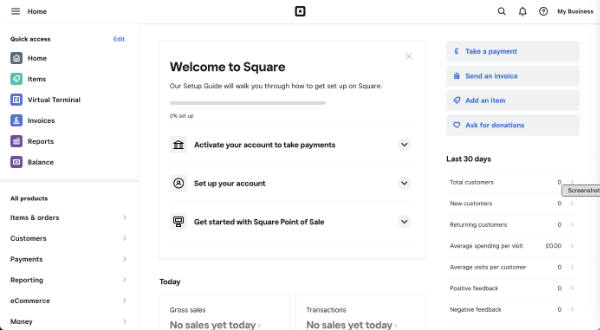
  • this is the screen you are presented with when logging in - after you've found the new URL for login! There is absolutely no way you know how to transfer to the website suite - because there's no recognition of its existence on the dashboard!!


The appalling Weebly to Square Transition Documentation

The transition documentation is essentially totally non-existent - in terms of what is commonly understood as best practice.

I doubt very much if they tested any of it with existing Weebly account holders.

You are referred to Weebly and Square FAQ (which is a Weebly Document)

When you create a Square Account (from the button in the notice email) you get access to documents associated with Square (i.e. General Terms of Service, Payment Terms and Privacy Notice you get when you set up your new Square login)

By creating a Square login, nothing will change with your existing website. For more information, please read here.
This link takes you to back to the document identified above - which does NOT provide a step by step transition process

Then in tiny type at the top of this document you notice it says  
If you're a Weebly user being prompted to change your login to Square, review our Weebly and Square FAQ article in our Square Support Center for the most up-to-date information.
The difference is this document sits within the Square Support Service - even if it is not recognised by the search facility for support!!!

It's titled Weebly and Square FAQs and states in one of the FAQs
I don’t have a Square account. How do I set one up?

Creating your Square account should only take about 5 minutes. As a Weebly customer, you’ll receive an email asking you to update to a Square account. Use the link in the email to get started. You can also start this process from your Weebly dashboard via a button in the announcement banner.

Once your Square account is created, you’ll log in from squareup.com using your Square email address. This means that you’ll have one login to manage everything related to your website and accepting payments online.

Check out our switching to Square Online FAQs for more information on accessing and managing your sites in your Square account
This highlights another document - which similarly does NOT provide a step by step process for those confused by the very poor communication for this transition process

Switch to Square Online from Weebly FAQs starts by marketing Square - which is wholly irrelevant at this stage!!

People just need to know
  • how to set up a Square account correctly to link with their existing website - and
  • to understand very clearly what are the implications of different options offeredIt does NOT address this in a simple and easy to read fashion.
It also says
What effect will this merger have on my Weebly account?

As part of our merger with Square, we ask that you replace your Weebly account with a Square account. You’ll use the Square account to sign in going forward, and all Weebly logos and branding will be replaced with Square branding
This note also states
Once your Weebly and Square accounts are linked, you’ll log in to your account from squareup.com using your Square email address. This means that you’ll have one login to manage everything related to your website and accepting payments online.
Finally they indicate what the url is for the login!!!

But - to come full circle - this is where I came in - this URL only provides access to the Square Dashboard and no way of accessing my websites!

The Square Support Page generates NOTHING about the transition for Weebly website owners (that's several million people!) 

Plus if you type in "Transition" you get nothing. Major mistake!

It's an all-round COMPLETE SHAMBLES! (I speak as one who used to implement new IT systems and understand full well the importance of the documentation which accompanies the transition)

TIP When you create you Square account

Friday, December 11, 2020

Two websites to resurrect - the question is where

What to do when your website host pulls the rug out from under your website


Today I discovered that my first two websites - Pastels and Pencils and my "hub" Making A Mark website - are no more. My Statcounter stats seem to suggest they disappeared sometime earlier this week.

On the plus side

I've had 15 years of free hosting from SiteKreator due to the fact that back when I was originally building these websites I recommended the web host - at the time - to very many artists who then adopted the host for their website and, as a result, I got upgraded to being a VIP customer. What I think they now call an "influencer".

Plus the websites worked well for many years.....

The page referencing my Portfolio website on my makingamark.co.uk website

On the down side

Sadly in recent times SiteKreator has been a platform which was 

  • VERY SLOW to gets its act together in relation to various online developments
  • had some very suspect developments - in terms of odd pages which would appear on my domain - which really got me wound up.
Plus SiteKreator sent me precisely ONE NOTIFICATION EMAIL back in June indicating that my site would go offline unless I upgraded and moved to their offering - and PAID!!

No reminders - nothing more.

I'm NOT impressed.

an extract from my "website Options" page on my artbusinessinfo.com website

How and where to move a website #1

Consequently I'm faced with either paying for new websites or letting the content go.

While neither website has been updated for some time (i.e. osteoarthritis makes making art difficult and I've still got a mega sort out job to do re. my resources info) I'm somewhat reluctant to let them go altogether 

What I'm doing in the short term

Here's what I'm doing

  • checking my own checklist (!) on Options for developing an Artist's website
  • keeping both domain names going with my registrar ( Namecheap - recommended )
  • archiving pages from the websites - using the Internet Archive / Wayback Machine - into Evernote (very easy and good practice for anyone with a website - and I find Evernote indispensable!)
  • identifying options for potential future sites - which might include 
  • comparing KEY FACTORS for choosing a host (see OPTIONS above)
    • storage
    • bandwidth
    • technical sophistication
    • pricing
    • (I'll do a blog post about this!)
  • thinking about how to 
    • prune and edit existing content
    • split the content between 
      • any new site(s) and 
      • existing new websites already in draft (on Weebly re techniques / genres / art materials)

Making decisions and building at least one new website


I think what's very likely is that between now and the New Year - which is always pretty quiet traffic wise - I'll start moving content and setting up one (maybe two) new websites.

Plus maybe blogging about choices and decisions.....

But blogging a lot less about art.....

Tuesday, November 10, 2020

Reporting copyright infringement & impersonation to Google - MAJOR FAIL

For all those who wonder what happens when you report the infringement of copyright or impersonation of your website or blog to Google.....

  • The good news - Google reviewed my report
  • The bad news - Google has not done what it told me it had done

In short:

  • Earlier this year I found a blog which had lifted my blog posts wholesale - and then changed some of the words - and decorated the blog with Google Adsense adverts
  • I reported it to Google in April - but heard nothing
  • I reported it again in September with a LOT more detail. To do a report you file a formal copyright infringement report - providing a lot of detail
    • see https://support.google.com/legal/troubleshooter/1114905
    • see https://support.google.com/legal/troubleshooter/1114905#ts=1115645 (re infringement via Blogger)
  • you wait for a long time 
    • My first report was ignored. 
    • My second report was filed on 14 September; 
    • I received an email from the Google Blogger Support Team today (9th November 2020)
  • you get an email saying they agree with you - and the blog is now suspended and will no longer be viewable
  • you check the URL of the offending blog - and FIND THE BLOG STILL EXISTS!!
  • you email the Google Blogger Support Team saying you are very unimpressed and are now writing a blog post about it
  • you email the Google Blogger Support Team saying you want to pursue the money paid to the blogger who impersonated by blog

GOOGLE FAIL

Bottom line what looks good on the surface does not deliver in reality
We take inappropriate content seriously
If you see content on a Google product that you believe violates the law or your rights, let us know. We’ll review the material and consider blocking, limiting or removing access to it. Behaviours like phishing, violence or explicit content may also violate our product policies and qualify for removal from Google products. Before creating a request, try to flag the content in the relevant product.
In visual terms this is what the process looks like.......

Wednesday, March 04, 2020

Adobe "on the rocks" of Apple macOS Catalina

Yesterday I got a brand new 27" iMac with a 5K Retina screen (because my old one died last week). This morning I set it up including upgrading to macOS Catalina which, as you may be aware, is a 64 bit application which does not work with 32 bit applications.


Which is when I found out that Adobe is obviously not equipped or staffed to cope with a very well signalled Apple upgrade to 64bit apps - and six months after Catalina was released has still not resolved the problems.

Bottom line Photoshop Elements - which I have been using since version 3 some 15+ years ago - is INCOMPATIBLE with Catalina!

I could not believe it when I read the following....
Adobe does not recommend that customers using old versions of Photoshop upgrade to macOS Catalina.


Incompatible versions (version 19.x and earlier) will not display in the ‘Older Versions’ list within the Creative Cloud desktop app.


Older versions use 32-bit licensing components and installers. Therefore, they cannot be installed and activated after upgrading to macOS Catalina. Upgrading to macOS Catalina with an older version already installed on your computer may allow the application to function in some capacity; however, you will not be able to reinstall or activate the application after the macOS upgrade.

from the Adobe website - Photoshop and macOS Catalina (10.15) known compatibility issues

This was somewhat galling to say the least given that 11 months ago, on 31st March 2019, I purchased Adobe Photoshop 19 from Amazon and installed via my Adobe Account - and in less than a year it is now UNUSABLE as it will not download to my new computer without problems.


Reinstalling does not work. That's because the installer works with a 32 bit system!!!!!

Adobe needs to get to grips with the fact that not everybody has the scope to wait around for ages while they work out to make their software work properly!

At first I thought I was going to have to shell out for PS Elements 2020 - but then I read the problems that version of the software has with Catalina.
Photoshop 21.0 & Photoshop 20.0.7 work with macOS 10.15 (Catalina) but have these known compatibility issues. You may want to remain on your current version of macOS until these issues have been resolved.
So basically Adobe is very definitely losing customers to alternative products. I'm absolutely certain I'm not the only one who has experienced problems just by the quantity of info I found online after running into this problem.

Pixelmator Pro - the cheaper alternative to Photoshop Elements


I've just downloaded Pixelmator Pro - which is fully compatible with Catalina macOS - from the Mac App Store - and paid less than half the price of PS Elements!


VIEW FULL SIZE Pixelmator Pro on Mac App Store

So far it seems to work - although it will take a little bit of getting used to after 15+ years of Photoshop Elements!

Guess who won't be taking out any sort of subscription to Adobe in the foreseeable future!

Thursday, April 25, 2019

Landscape Artist of the Year goes BIG!

Those of us who do not have Sky TV have been watching the Artist of the Year programmes on computers tablets and smartphones - in my case - an iMac and iPad Pro. Every time I wanted to watch it BIG I had to sit at my desk and watch it on my iMac.

BUT NO MORE

As of this afternoon, I am now looking forward to watching Landscape Artist of the Year on my television!

The Now TV Stick instruction leaflet

That's because this afternoon I collected my brand new FREE Now TV Stick from the Sorting Office and installed it - after a false start on my TV.

I've been recommending people who don't have Sky to watch via Now TV - and I'm now suggesting for those who have already subscribed to Now TV (Entertainment Pass)
  • you also get hold of a Now TV Stick FOR FREE and 
  • get it installed before Landscape Artist of the Year starts.
If you already have a Now TV account you probably got an email this month offering you the FREE Stick. All you have to do is find the email and then send off for it.

Then install it!

It works if you have a television with HDMI slots which is connected to the internet.

I found the instructions a little opaque but finally figured it out. However I thought I'd make a note of what I did - and then thought I might as well share it with others who will be doing the same. Hence this post.

After I'd checked I'd got HDMI slots free - this is where the iPhone comes in handy when you don't want to turn the TV round.

checking my HDMI slots via a photo!
My stick wouldn't work with the "plug into your TV's USB slot" but worked fine one when I used the cable to plug into the power plug instead to power it (little white light winks on the stick when it's plugged in and powered up).

Then I just went to the AV button and selected the HDMI slot it was plugged into - and off we went through the installation.
  • First you have to pair your Now TV remote control with the TV - which seems to go pretty smoothly so long as you point it at the TV
  • Then you have to make a connection with your wifi - first choose the correct wifi network to joint - and then insert the wifi password! (Latter was the longest bit of the whole process!)
  • Next to get a connection to Now TV you must insert a code. The code will come up on the television screen - and then you need to go to www.nowtv.com/TV to insert it. Make sure you've logged into your Now TV account in order to put in the code. 
  • Ignore the stuff about vouchers and passes if you already have one
  • Then basically it's getting the stick updated with the various apps
  • and before you know it you're starting at the normal Now TV screen on your television screen rather than your computer or tablet.

Wednesday, September 26, 2018

To hang an exhibition you need a few tools

Yesterday I was in the Mall Galleries as the finishing touches were put to the hang of the 2018 Annual Exhibition of the Society of Women Artists.

I'll be writing the review of this excellent exhibition tomorrow.

In the meantime here's an insight to some of the tools that the Tech team at the Mall Galleries use to hang an exhibition of 450 artworks in two days.

Basic tools - tapes, level, screws and cordless drill

First the artwork has to be laid out on the floor in terms of how it needs to be hung on the wall


Then the tech team and their super duper kit mobile home move in

The Tech Team Toolkit - on wheels!
A place for everything - and some of it in place and some of it in use
On the reverse there are tapes and wedges for every possible use

Wedges and tapes
Finally the big steps come out so as to adjust the lighting so it enhances the framed artwork on the wall

Very very big steps for adjusting lights
The Tech Team form part of the exhibition support for those hiring the galleries for their exhibition

Sunday, September 02, 2018

Making A Mark in August 2018

Fans of Making A Mark will remember the "Who's made a mark this week?" posts which I had to discontinue in 2014 as they were taking over my life.

Since then I've diversified and now have other active websites and blogs - and what you used to see on Making A Mark can now be found elsewhere.

I've been mulling on how to profile what I've written and seen and today I'm going to start a trial of a NEW MONTHLY SUMMARY of
  • posts on my blogs and website updates 
  • coupled with some of the posts to three of my Facebook pages
Tell me what you think of it - on Facebook!

Making A Mark in August 2018


For those who missed my posts because you were on holiday or life intervened...

All posts are from Making A Mark except
  • ABI = Art Business Info. for Artists
  • BBA = Botanical Art and Artists

Artists


    Image of Wyeth's Studio, © Phil Bradshaw, FreshFly
    • The Andrew Wyeth Movie - a hugely popular blog post. - an extended trailer for the new documentary film about Andrew Wyeth, originally planned for a 2012 release - but due to launch this month!
    • BBA - Video Interview with Kathy Pickles - Between 1991 and 1996, Kathy Pickles exhibited every year at the RHS Botanical Art Show. Each year she won a Gold Medal for her exhibit. In 2015, after nearly 20 years, she returned for a sixth time - and won a sixth Gold Medal.... and I've just found the video interview I did with her at the time!
    • Lucian Freud - paintings of plants and gardens - following the exhibition at the Tate I did a an inventory - in a timeline - of all his paintings of plants with:
      • notes about their context and location
      • links to where you can see them and 
      • quotes by people - including Freud himself - about his paintings of plants and why he did them.
    "The subject matter has always been dictated by the way my life has gone. I noticed that when I was under particular strain, I didn't feel so like staring at people or bodies all day." It was at times like these that the palm, the Egyptian Book, thistles, cyclamens, buttercups, substituted for sitters. Seeing through the skin

    Calling All Artists - Art Competitions and Open Exhibitions


    Monday, May 28, 2018

    Rewriting your Privacy Statement and Cookies Policy


    I wrote Privacy Policies - which covered the use of Cookies - for my websites and blogs yonks ago.

    Of course, the advent of GDPR has meant that they now ALL need to be updated to become compliant with GDPR.

    However what I did not anticipate was that I would be writing and re-writing the Privacy and Cookies Policies over and over again. (For the record the one for this blog needs rewriting again and my latest / most up to date version is on Art Business Info. for Artists - but that needs more work!

    That's because although I read the guidance and knew pretty much what I needed to do it took until 24-25th May before most 'well-informed' people published their new Privacy Policies - which means that I now have a huge reservoir of policies to look at to see which work best for me.

    The main difference to what I had before and what I need now is that the Policy now needs to be 

    • spelt out systematically 
    • sit under heading(s) which say 'Privacy Statement' and 'Cookies Policy'.


    If you haven't even started writing a Privacy Policy 


    I've  decided that when it comes to rewriting you can't fail if you reference the Privacy and Cookies Policies of certain leading websites.

    Which is why below you can find links to some of those I feel certain will have got it right. Have a read and then decide what works for you.

    Information Commissioner's Office


    Where better to go than the website of the Regulator?
    • Privacy Notice (over several pages - but an easy read)
    • Cookies Policy - their deeply nerdy goody two shoes approach has every cookie nailed and explained!

    Gov.UK


    Always worth checking out what they are doing on the Gov.UK website - they should be leading from the front! This is Gov.UK's

    It's kept very streamlined and simple. very much a recommended read. Here's its take on Google Analytics.

    Google Analytics stores information about:
    • the pages you visit on GOV.UK
    • how long you spend on each GOV.UK page
    • how you got to the site
    • what you click on while you’re visiting the site
    We do not collect or store your personal information (for example your name or address) so this information can’t be used to identify who you are.
    We do not allow Google to use or share our analytics data.
    Google Analytics sets the following cookies.
    NamePurposeExpires
    _gaThis helps us count how many people visit GOV.UK by tracking if you’ve visited before2 years
    _gidThis helps us count how many people visit GOV.UK by tracking if you’ve visited before24 hours
    _gatUsed to manage the rate at which page view requests are made10 minutes

    The Royal Family


    I just assume they have somebody advising them who knows what they are doing!  Here are the policies for the website - AND their operations more generally, which interestingly artists might find interesting given there is a lot of get out and about and interact with other organisations.

    Here are their:
    • Privacy Policy
    • Note in particular the two paragraphs relating to cookies on the Royal Family website and Google Analytics cookies - this is what I call stripped back!

    The National Gallery


    I thought it worth checking what some of the major art organisations were saying.
    • Privacy Policy - set out in chunks with a separate page for each section
    • Cookies Policy - also chunks - the advantage being you can get straight to the bit you want. They have a complete breakdown of all the cookies - which means you have a good chance of finding the ones you need to list

    Google

    Every Google product seems to reference the Privacy Policy for the country you are located in.

    This is the Google Privacy Policy for the UK - with the link found at the bottom of the Feedburner website which I use for email subscriptions to this blog.

    Suzanne Dibble


    Suzanne Dibble is the lawyer who has grown the GDPR For Online Entrepreneurs (UK, US, CA, AU) Facebook Group from zero to 35,000+ members since February. It's probably the most sensible GDPR Group around - plus it has lots and lots of videos addressing different aspects. Worth a wade through - but a warning - you will be overwhelmed!  It's targeting small businesses more than sole traders.

    You haven't got a hope of copying either of the following for her business website (far too canny for that!) - but they are both definitely worth a read

    Here is her:

    My recommendation. Think of a website and operation that is very like you - and have a look at what they've got to say.

    CAUTION: There is no way of knowing who has got it right. However taking a look at the websites of those who SHOULD be setting an example gives us a good steer towards getting our statements right.

    and finally.....

    All the messages coming out of ICO suggest that they are very much looking towards helping small businesses rather than fining them.

    Don't ignore GDPR - but also don't anguish over whether you've got it all 100% right.  If you got it wrong then all the PR suggests that they will be looking to provide guidance in the first instance


    Wednesday, May 23, 2018

    Artists and GDPR - what would you like to tell the EU (and ICO)?

    This is your opportunity to comment on what you think of GDPR and its impact on artists and small art groups/organisations.

    I was asked yesterday to provide a comment to a German news organisation and this morning sent them a written response to the questions they asked - see below.

    But as an artist or illustrator or arts organisation WHAT DO YOU THINK?

    • are you aware of GDPR?
    • do you know what you have to do to comply with the new regulation as from Friday 25th May 2018
    • have you done anything to date?
    • are you planning to do anything
    • how do you feel about it?

    Please comment below - and you never know your comment might also be incorporated!

    Reference to previous posts below (re. GDPR background/actions) and a small treat at the end of this post for those who get that far!


    I think maybe the ICO website is having a few problems with demand for information
    with only two days left before the Regulation becomes operational


    ___________________________________

    questions

    1. How might the GDPR negatively effect artists and artist organizations? Does simple human oversight and a failure to 'opt-in' before May 25 mean that artistic communities could lose contact with many of the people they rely on to survive? 
    2. Why has the 'one size fits all' roll-out of the GDPR been problematic for artists and art societies? 
    3. Anything else you'd like to add?

    my response

    The EU comprehensively failed to assess the impact of this change in regulation on the sole trader - and artists are no different from any other sole trader in this respect.

    The definition I've seen of a micro business is one with less than 250 employees. We all know full well there are very many active sole traders and and thriving small businesses and trading operations which have anywhere between 1 and 10 employees. Two years ago when this new regulation was approved, both the EU and the national agencies responsible for the implementation of this new regulation totally failed to communicate effectively with sole traders and the real micro businesses (i.e. those with less than 10 employees). As a result, they have only succeeded in frightening them and sending them into a spin with very little time left to implement change. I'd liken it to the complete insensitivity of the disastrous change in VAT levied on digital products in 2015 (such as eBook and video tutorials) which was made without any thought whatsoever for the implications for the sole trader.
    The EU needs to stop ignoring the fact there are HUGE numbers of sole traders - including artists - operating within the EU.
    • Sole traders are periodically strangled by EU red tape designed to catch the very large organisations who sidestep and/or ignore regulations and tax.
    • Of course, the EU should tackle the lack of proper security of personal data (and evasion of tax etc.) by corporate entities - but they need to make robust and realistic assessments of the impact of their "one size fits all" regulations on sole traders and extremely small businesses in the process! 
    • The level of change is seismic in its impact for a sole/small trader such as an artist compared to companies which can afford to employ individuals to tackle this topic. It's very likely to succeed in causing much anxiety and choking off economic activity at the grass roots.
    However due to the very poor communication, I suspect most artists are still not aware that ANY change is happening on 25th May. Very many will not be aware of the complete range of changes they are expected to make. They will undoubtedly carry on as before. Whether this becomes a problem for them in the future is hard to say. I certainly don't think the regulators should be spending their time chasing after artists who probably don't understand much of the language and terms that the regulations and guidance is written in. 

    Lawmakers and regulators should very definitely get their priorities in order and focus all their efforts on holding the corporate giants to account!

    and finally......


    I've been collecting GDPR Privacy Policies - and if you are at the screaming ab-dabs stage with yours you might enjoy reading this one - The Writers HQ - Privacy Policy

    Sunday, May 20, 2018

    Art Galleries and GDPR

    If you as an artist are sweating over GDPR - otherwise known by its longer name of General Data Protection Regulation - just imagine what it's doing for art gallery owners, directors and managers - and any and all art dealers.

    The Financial Times has a particularly good article on this topic A secretive art world grapples with data protection which highlights some of the issues for art galleries and dealers and the scope to tear down the walls they keep around their major asset - information about individual collectors
    galleries record extensive personal information about collectors and clients — from their tastes and their buying histories to their private addresses and even their dietary preferences. 
    As from next Friday 25th May 2018 (i.e. 5 DAYS LEFT)if a collector enquires, an art gallery has to produce all the  data they hold about an individual.

    Then there's the issues of
    • provenance which is important in relation to how long personal data is kept. Keeping a track record of purchases and sales of art is crucial to the maintenance of credibility and value.
    • the black lists - who is not allowed to buy art from a gallery
    which appears to be leading to some interesting explorations of which records are and are not subject to GDPR (and hence whether or not they must be revealed).

    Cork Street - as was - before the developers got going, pulling down buildings.....

    For more about GDPR


    What I've written so far

    Facebook Groups and Other Resources

    Other Articles


    DISCLAIMER: I am NOT an expert on this topic - even if I know more than you! Nothing stated on this page is legal advice. Like you I'm just trying to work my way through the maze of online information about GDPR. Hence this resource should NOT be construed or relied upon as legal advice. You are not my client and I do not know your individual circumstances - meaning I have no liability to you in any circumstances should you choose to rely on any of the materials on this page - although whatever is published by the ICO should be more authoritative than most.

    Friday, March 23, 2018

    Got the GDPR Jitters? 10 things you need to know as an artist / art society / art gallery

    The law on data protection says what you should do when you collect, use, store or do anything else with people’s personal data. This law changes on 25 May 2018. Making data protection your business | ICO


    The NEW & MANDATORY General Data Protection Regulation (GDPR) takes effect on 25th May 2018. 

    I was not surprised that my inbox yesterday contained an email from the Treasurer of an Art Society about GDPR - which I've provided edited highlights of below
    Please forgive me disturbing you, I am the Treasurer of (an art society). We are a small society based in (a county). We are a mixture of Amateur and Professional Artists, and I have been getting the "jitters" regarding GDPR and our mailing list that we use to invite prospective clients to our Annual Exhibition in July.
    In my opinion the Treasurer is quite right to be getting "jitters" if they have done nothing yet to make sure they are going to be compliant.  On the other hand, with good organisation, a calm approach and some sensible actions I think it's entirely possible they can be compliant in a pretty short space of time.

    The main challenge is in educating people and maintaining that compliance over time - and NOT lapsing back into bad habits.

    Frankly the GDPR thing is so enormous, that initial attempts to explain it while well-meaning have tended towards a "one size fits all" approach and forgotten to tailor it more specifically to sole traders as well as very large organisation (and everybody inbetween!)

    Fortunately, progress has been made since my last post on this topic Is your art organisation or business ready for GDPR - the replacement of the Data Protection Act? and there's now some much better information and guidance around - including some specifically for the small trader and smaller organisation or charity.

    Bottom line - Governments are getting VERY serious about the protection of breaches of regulations that protect people's personal data.
    • mistakes are no longer acceptable
    • unwillingness to change is NOT acceptable
    • regulations make change mandatory
    • financial penalties mean people are paying attention.
    Many members of the public are demanding higher standards from organisations – large and small – that collect and use their personal information.

    10 things you need to know about GDPR
    - as an artist / art society / art gallery


    Before you start reading, I want to emphasise that I still haven't got my head around all of the published information on GDPR - by a long way - so any information below is given without any liability to the reader.

    You need to do your reading just as much as me!

    ONE - just to get your attention....


    Breaches of GDPR can lead to FINES of up to 4% of annual global turnover or €20 Million (whichever is greater).

    Just think - that could be 4% of Facebook Income or 4% of Google Income - or 4% of your turnover - BEFORE expenses!  Which is why they are taking this seriously!

    Now I've got your attention I can tell you that the Information Commissioner's Office in the UK have also said
    Monetary penalties have been and will continue to be a last resort of our regulatory action – our primary aim is to support businesses to get things right and improve their practices where required.

    TWO - this one concentrates the mind wonderfully!


    There are just 62 days left until the new Regulation (that means NOT OPTIONAL) becomes operational.

    THREE - why this applies to YOU


    The General Data Protection Regulation (GDPR) applies to applies to every person and every organisation processing personal data about anybody living in the EU.

    That means for those in the art world, it's anybody who collects personal data about other individuals who live and/or work in the EU.

    This includes:
    • ALL sole traders (i.e. artists who sell their work to people; art tutors who educate people), 
    • ALL Charities and not-for-profit organisations - such as Art Societies that have marketing email lists and membership lists
    • ALL Art Schools - which maintain personal information on their students
    • ALL Art Galleries - which maintain personal information about buyers and artists
    Basically it means ANYBODY who records and processes personal data MUST comply with the regulation.

    FOUR - Help is available for sole traders and micro businesses


    Tuesday, February 06, 2018

    Artists websites in 2018

    This is about artists websites in 2018 - what has changed and what has not - and what needs to change!  It looks at:
    • the pros - what has improved
    • the design - what has and has not changed
    • the words - why these are now much more important than they used to be
    • the weaknesses - identifies perennial weaknesses which still need to be remedied
    • the faults - highlights aspects which MUST be addressed 

    some of the key factors which enable people to find and like your artist's website

    I look at thousands of artists websites every year. That's because I write posts about those artists selected for the exhibitions of major art competitions and those winning prizes at the exhibitions of national open art societies in the UK.

    I'm possibly one of a relatively small number of people (who knows - there may only be me!) who looks at so many artists' websites on a regular basis - and has done so for most of the last decade.  I'm also not just "looking" at them - I'm trying to extract data about the artist to check I've identified the right person and/or create a brief profile.

    It occurred to me at the end of last year to write a post about artists' websites in 2018 after I wrote Selected artists for Columbia Threadneedle Prize Exhibition 2018

    Recently this has been reinforced by writing about the professional and amateur artists appearing in the Portrait Artist of the Year competition on Sky Arts and the blog post I wrote yesterday about Selected UK artists for 'In Ruskin's Footsteps' (Botanical Art Worldwide #4).

    Then I spotted a comment on Facebook yesterday by Jimmy Wright writing on behalf of The Pastel Society of America
    You need to have a basic website that makes you and your work visible online. While doing research for the summer issue of PSA's Pastelagram, it was frustrating for the editors to not be able to look at an artist's work or do basic research on an artist online. A website is worth the effort and expense. How will a magazine editor, gallery director or collector find and follow your work? You can't expect an effective introduction to a gallery without having a website.
    Below I'm going to write about the current trends I've spotted.  

    This follows on from a selection of my posts about artists' websites in previous years:

    Artist Websites - The Pros


    I'm now noticing a sea-change amongst those SELECTED for prestigious art competitions - which are typically contested by professional or 'aspiring to be' professional artists.

    The following observations are based on my standard research query which is "name of artist" + art.
    • artists' websites are now much easier to find - re. younger / professional artists ONLY! Most of these now have websites and most are on the first page of Google. Many are in the top five results on Google for my search query. (Galleries showing the artist often do better than the actual artist's website).
    • almost all professional artists now use their name for their website's domain name. Where the name is common (or there is a popular person - or another artists - with the same name) it is common to find websites which have added 'art' or 'artist' or 'fineart' to the personal name in the domain name URL. This pretty much now seems to be the rule - signal occupation as well as name - to ensure the website gets found quickly.
    • many have dropped the arty bollocks style of writing and are now using plain english. Such a relief!

    Artists Websites - The Design


    Websites MUST now be optimised for tablets and smartphones. There has been some major changes in the devices used and the structure and coding of websites in the last decade.The major change is the way traffic has switched away from desktop computers to mobile devices.

    In design terms, on artists websites I now see the following much more and indeed they are becoming common features on the websites of more professional artists.

    Thursday, December 14, 2017

    How do you get your art ranking in Google? Your NEW Google Guide to SEO

    How do you get your art ranking in Google?  That's what most artists want to know when they go online.

    These days most professional and many semi-professional artists operate online using a website and/or a blog.

    However this is only effective if people can find that website or blog when searching for you or the sort of art your produce.

    Many - but certainly not all - artists also know that to enable people to find their website they also need to has at least a passing acquaintance with SEO i.e. search engine optimisation. This is the legitimate process of making your site rank better in search engines.

    Yesterday Google launched a launch of a NEW updated SEO Starter Guide 
    (I suggest you bookmark this link - it's important) 

    This is the first major update since 2010.

    Below I provide an overview of the content and what's different. The main difference is that due to the overlap between the previous Guide (a pdf file) and the Webmaster Academy advice which was online - the two guides to what to do re SEO have been MERGED!

    The NEW Starter Guide MERGES
    the SEO Old Starter Guide PDF (c.2010)
     and advice from the Webmaster Academy

    I'd recommend everybody take a look at the new guide and check out whether they are following all the recommended practices.

    The contents are listed below - click any link to find out more about what Google recommends if you want to do well on Google
    This guide won't provide any secrets that'll automatically rank your site first in Google (sorry!), but following the best practices outlined below will hopefully make it easier for search engines to crawl, index and understand your content.

    What's different?


    I always like those pages which explain what's different in this issue compared to previous versions. Unfortunately Google hasn't issued one! So I went looking to see whether anybody else had detected any differences between previous recommendations and this new presentation.

    The differences I'm seeing highlighted relate to:
    • The new guide MERGES the Webmaster Academy and the old SEO Starter Guide PDF (2010) into one resource section online.
      • It can be found under "Search Console Help" - this is the service Google offers to help you monitor and maintain your site's presence in Google Search results.
      • It has much fewer pics - and these tend to be monochrome - and some beginners may find it less friendly than the old 2010 document.
    • The imperative for the update seems to have been MOBILE!
      • the progress in technology and 
      • how things work on mobile devices - which is now very different from how it was in 2010 
      • sites used to have seperate mobile pages rather than using the responsive templates which most modern sites now use.
    • The author of the official announcement chose to emphasise the following
    The updated version builds on top of the previously available document, and has additional sections on the need for search engine optimization, adding structured data markup and building mobile-friendly websites.
    • Hence new sections for:
      • the need for search engine optimisation
      • how to add structured data mark-up - (which I shall be reading as I still haven't figured that one out!)
      • building mobile-friendly websites - see Make your site mobile-friendly which emphasise the best practices for creating mobile-friendly websites that can be accessed by all devices. 
    I've just checked the latter in relation to my existing advice in How to be mobile-friendly in the Websites for Artists section of my website Art Business Info for Artists - and I'll now be rechecking a load of links to make sure they're accurate and properly descriptive of the new places they're now being redirected to!

    Below are some articles which seem to address the issues re. what's changed

    The two below essentially say "It's happened" and revise what the Google blog post says! I'm actually really surprised there hasn't been more analysis online by now.

    If you have queries please don't ask me! Rather try using the Google Webmaster Forum where you can connected with other webmasters and top contributors in the Google Webmaster Tools forum.

    Here also is the new Google Page for Get support for your site.

    Google Search Console


    Here are the current contents of this Google service