Showing posts with label website matters. Show all posts

Wednesday, October 09, 2024

How to lose your website's domain name

There's a very easy way to lose your Website's presence on the internet AND all its followers.

Just FORGET TO RENEW YOUR DOMAIN NAME

Your website still exists - but nobody can see it. That's all. It's really very, very simple.

I've lost count of the number of artists and art societies / groups / organisations who have fallen foul of thinking somebody else would remember to remind them that the licence for the domain name needs renewal.

This morning I came across another to add to the list.

Things you must remember

  1. You do NOT own your domain name
  2. When you pay for a domain name, you license it for a specific period of time
  3. If you do NOT renew the licence in time you risk losing your website's presence on the internet i.e. your website ceases to exist
  4. If you are unable to re-register the domain name, all the effort you have made to get the domain name recognised is wasted
More VERY IMPORTANT TO BE AVOIDED AT ALL COSTS TIP at the end - and the last two are critical!

Why are domain names important

Domain names provide a unique way of referencing a single unique site on the internet.

Hence they are very precious. They are that important. 

Quite often people buy their domain names before they've even worked out how they are going to build their website.

Speaking personally, I own far more domain names than I do websites. That's because I've got a bunch of them which were bought for defensive reasons i.e. I didn't want anybody else having the name.

How domain names work

Friday, September 08, 2023

Am I hacked or not? Or is it all Google's fault?

I feel like Google has got me running round and round in circles at the moment on my laptop. Plus I think Google may well be the maverick in the mix!

Google is telling me - via Search Console - that a website I own has been hacked i.e. 

  • a new sub-domain URLs exists - whereas I never ever use sub-domains
    • i.e. sub domain name prefixes exist (e.g. https://hacker.mywebsite.com - where I own mywebsite.com )
  • this is identified by gmail headed Alert - Hacked content found on (your website domain name URL)
  • they then identify new website owners - of the new sub-domain
  • this is identified in a gmail headed New owner for (sub-domain website URL)

Identifying non-existent sub-domains

I need to get them deleted but first I have to find them - and that is proving very difficult

To date, I have been wholly unable to identify any sub-domains - which should be obvious given how my page listing works.

It could be a tiny bit of script somewhere - but I haven't been able to find it as there are no clues as to where it is located.

Removing sub-domains


So I've been looking for help from Google by stopping all the sub-domains from being shared via the Google Search Index instead!
  • via the Removals Tool in Search Console (in the Indexing Section in the left hand column)
  • BUT this is only a temporary measure
Where you find the Removals tool


Google has acted on all my requests except one - for some reason. Need to work that one out.
However the removal from the index is only temporary - and I still need to work out why they exist.

Non-existent owners with gmails


I've reported the gmail addresses used by new sub-domain owners to Google Gmail 
  • despite the fact that Google Search Console say they do not exist!!
  • you can check who owns your website / domain name via Search Console Settings and Ownership Verification.


Unhelpful websites

So far, both my domain name registrar (Namecheap) and my website host (Square/Weebly) have proved to be pretty useless at helping me out. 

Neither have explained how the particular hack affecting me happens - and yet I can't be the first.

Apparently it's all down to me!

A helpful site if you get hacked


I have found one helpful website while working my round what on earth is going on.

Take a look at https://hacked.com/been-hacked/ for a page of tips and recommendations.

They also provide remote help for a fee. I've not tried it - as yet.
I'm still working on the principle that Google is doing something wrong!

One more thing..... Country blocking


I've got a stats package which provides very detailed answers and at the moment I have worked out that it looks likely that all the hackers and the sub-domains come from either China or Malaysia

So my next task is to work out how to block China and Malaysia!

I've done this before - but can't remember how and I think it might have been on different webware. 

I think I've just found an inexpensive app which might do this. It's worth a go....

Monday, March 13, 2023

A timely art business reminder

It's a timely reminder for me! 

In the days of digital calendars we can set up reminders to renew:

  • website hosts
  • domain name registrations
  • any other service we pay for relating to our website
The thing is we tend to input credit card details or include a balance on the account to pay for these - thinking everything will just rollover automatically when it comes time to pay. No need to worry

Forgetting that our cards all have expiry dates - and when the card is expired - as mine did at the end of last month - it cannot be used to make the automated payment.

I just spotted the email in time to get things sorted - as my payment was due and the notice about my card having expired had been issued 

This was the notice I got this week.


It's really very easy to lose an email if you get a lot (as I do) and they race off your front page or you're very busy and don't look at your emails for a few days - or you get ill!

So 
  • keep a note of the credit card used against each website service / domain name and WHEN it need to be updated
  • input the renewal dates for all relevant services to your digital calendar - with an alert set up for a week beforehand and an annual reminder turned on
Otherwise your website or your domain name could end up like VERY MANY I've come across in my time looking for artists websites - offline and potentially dead and buried.

To be honest, the most common problem seems to be the failure to renew the domain name. I've come across many websites which indicate a domain name renewal problem.

Thursday, September 22, 2022

Do you have a Weebly website?

This post is for owners of a Weebly website. It's a bit techie - but not as techie as it should be!

What follows covers
  • the background to the transition from a Weebly Account to a Square Account - by 6th October 2022
  • problems encountered en route
  • the appalling transition documentation
  • TIP when you create your new Square account
  • How to login after you've setup your new Square account
  • What next?

Background to Weebly to Square Account Transition


Weebly is one of the main webware houses for artists' websites - with Wix and Squarespace being the others (as in millions of websites!)

Weebly is currently trying to transition its website owners from the Weebly account / login to a new Square account / login. That's because Square - which is essentially an ecommerce operation - acquired Weebly in 2018. 

As a current Weebly user, you are required to update your login and connect with Square by October 6, 2022. With Square, your site will have an extra layer of security with two-factor authentication, access to a suite of business tools, and the ability to process payments more securely.

Problems encountered

There's just a few problems! Such as:

  • the transition process is not very customer oriented - as in writing a set of "this is what you need to do in very plain simple steps + this is how it works in future" i.e. specifically for the consumer
  • the new login URL for Square is buried DEEP within the transition FAQs text. It's https://squareup.com/gb/en
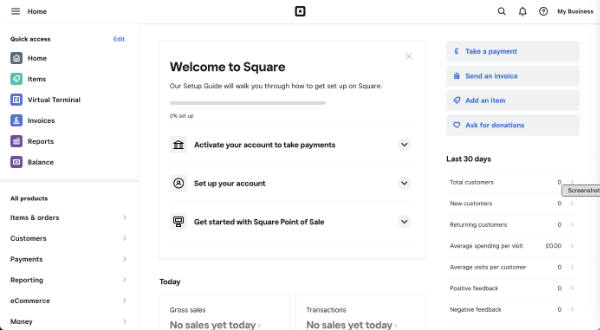
  • this is the screen you are presented with when logging in - after you've found the new URL for login! There is absolutely no way you know how to transfer to the website suite - because there's no recognition of its existence on the dashboard!!


The appalling Weebly to Square Transition Documentation

The transition documentation is essentially totally non-existent - in terms of what is commonly understood as best practice.

I doubt very much if they tested any of it with existing Weebly account holders.

You are referred to Weebly and Square FAQ (which is a Weebly Document)

When you create a Square Account (from the button in the notice email) you get access to documents associated with Square (i.e. General Terms of Service, Payment Terms and Privacy Notice you get when you set up your new Square login)

By creating a Square login, nothing will change with your existing website. For more information, please read here.
This link takes you to back to the document identified above - which does NOT provide a step by step transition process

Then in tiny type at the top of this document you notice it says  
If you're a Weebly user being prompted to change your login to Square, review our Weebly and Square FAQ article in our Square Support Center for the most up-to-date information.
The difference is this document sits within the Square Support Service - even if it is not recognised by the search facility for support!!!

It's titled Weebly and Square FAQs and states in one of the FAQs
I don’t have a Square account. How do I set one up?

Creating your Square account should only take about 5 minutes. As a Weebly customer, you’ll receive an email asking you to update to a Square account. Use the link in the email to get started. You can also start this process from your Weebly dashboard via a button in the announcement banner.

Once your Square account is created, you’ll log in from squareup.com using your Square email address. This means that you’ll have one login to manage everything related to your website and accepting payments online.

Check out our switching to Square Online FAQs for more information on accessing and managing your sites in your Square account
This highlights another document - which similarly does NOT provide a step by step process for those confused by the very poor communication for this transition process

Switch to Square Online from Weebly FAQs starts by marketing Square - which is wholly irrelevant at this stage!!

People just need to know
  • how to set up a Square account correctly to link with their existing website - and
  • to understand very clearly what are the implications of different options offeredIt does NOT address this in a simple and easy to read fashion.
It also says
What effect will this merger have on my Weebly account?

As part of our merger with Square, we ask that you replace your Weebly account with a Square account. You’ll use the Square account to sign in going forward, and all Weebly logos and branding will be replaced with Square branding
This note also states
Once your Weebly and Square accounts are linked, you’ll log in to your account from squareup.com using your Square email address. This means that you’ll have one login to manage everything related to your website and accepting payments online.
Finally they indicate what the url is for the login!!!

But - to come full circle - this is where I came in - this URL only provides access to the Square Dashboard and no way of accessing my websites!

The Square Support Page generates NOTHING about the transition for Weebly website owners (that's several million people!) 

Plus if you type in "Transition" you get nothing. Major mistake!

It's an all-round COMPLETE SHAMBLES! (I speak as one who used to implement new IT systems and understand full well the importance of the documentation which accompanies the transition)

TIP When you create you Square account

Wednesday, November 17, 2021

Cons and Pros of ING Discerning Eye Exhibition's tech makeover

I visited the ING Discerning Eye Exhibition 2021 at the Mall Galleries today (after my hip hiatus last week) and left rather sooner than I expected to because It made me feel VERY irritated.


I'm going to deal with the technological changes associated with this exhibition in this post and may write another one about the exhibition itself. These are:

  • QR Codes as the ONLY wall labels
  • new website - with some significant omissions

This is the toned down edited version - which will tell you a lot.

I'm also going to comment on the technological change associated with the website - which is much more of a good news story - but with a big sting in the tail....

But first the really bad news....


QR Codes only as labels - and absolutely nothing else!

The ONLY labels on the wall are QR codes i.e. 

  • No artists name next to their work
    • I'd hazard a well-informed guess that this is completely unacceptable to most artists.
    • If the organisers knew they were going to do this then they should have stated their intentions in the Call for Entries
  • No printed catalogue of which more below....

This is what I wrote on my Facebook Page after having made my way past maybe a dozen artworks in the East Gallery which I visited first


I think if I was an artist who had submitted my artwork to this exhibition - and had been selected by one of the Selectors - I would be very seriously dischuffed.

  • no profile for me as an artist which is plain to see
  • less chance of selling my work
  • less chance of being noticed by art gallery owners who visit exhibitions like these looking for new talent.
Don't get me wrong. I am NOT against 

  • EITHER the use of new technology
  • OR the intelligent use of QR codes to enhance the viewing experience 
As an ex senior manager who has been responsible for and managed the large scale implementation of new technology solutions in the workplace in the past, what I am VERY averse to is:
  • poor communication - to both artists and visitors
  • no scope for feedback from those who experience the "experiment" e.g. "how did you find our use of QR codes?"
  • poor project management e.g. a rollout without beta testing which fails to identify issues which need resolving (i.e. provide a good customer experience - based on what those using the system think not what those responsible for implementing it think!)

The Issues


Some of the technological issues are:

Broadband / Wifi

  • Broadband is not good in the Galleries - patchy at best and totally absent from the North Gallery
  • Hence visitors have to use the Gallery wifi system - which means opening up their phones to a public wifi system i.e. that thing you are warned against doing and I never ever do! Who is liable if somebody gets scammed as a result of using public wifi - because some scammer will find out it's available....
Good luck with finding out anything about these pieces in the North Gallery
- where there is no secure broadband - just public wifi

Smartphones

  • Not everybody has a smartphone 
  • Not everybody has a smartphone which can recognise QR codes

Communication on paper

  • There is ABSOLUTELY NOTHING on the wall which tells you the name of the artwork; the name of the artist, media used and price
  • Some extremely tatty, unlaminated - and hence not clean -  bunches of paper at the front desk for those with no phones is dire beyond belief and in absolutely no way a good substitute for proper labels! 
    • Which bit of Covid Best Practice do the organisers of this competition think this complies with? Or didn't they think?

Bottom Line


I walked out because I wasn't enjoying the exhibition. 

Here's the reasons why:

Thursday, March 18, 2021

They can't cancel Spring

"They can't cancel Spring" started last March with a message from David Hockney.

He posted the iPad drawing below to Instagram - from his base in Normandy where he was under lockdown.

The Art Newspaper (and various others) took it up and published A message from...David Hockney: 'Do remember they can’t cancel the spring' exactly a year ago today.

Jonathan Jones followed up in the Guardian with his article on 2nd April How David Hockney depicted a spring for self-isolationists


Spring Cannot Be Cancelled


Spring Cannot be Cancelled
by David Hockney and Martin Gayford will be published by Thames and Hudson on 25 March 2021. (The link above goes to Amazon UK - my copy is already on order!)

This is 
a new book of conversations and correspondence between David Hockney and his long-time friend and collaborator Martin Gayford, in which the artist reflects upon life and art as he self-isolates in rural France.
Hockney moved to Normandy after he became 80.
when Covid-19 struck, it made little difference to life at La Grande Cour, the centuries-old farmhouse where the artist had set up a studio a year before, in time to paint the arrival of spring. In fact, he relished the enforced isolation as an opportunity for even greater devotion to his art.
The book is illustrated with images of Spring drawn and painted on his iPad. Many who viewed his major exhibition at the RA in 2012 (see my post Review: David Hockney RA - A Bigger Picture) will remember how much Hockney said he exalted in the arrival of Spring and loved to paint the foamy blossom on the Hawthorn bushes in in the East Yorkshire Wolds west of Bridlington where he lived at the time 'on location".

This time we'll see what he makes of Normandy!

They Can't Cancel Spring

.....is also the name of the Spring Exhibition of the Royal Watercolour Society. See They Can't Cancel Spring on the RWS website


This opens this evening - with a virtual evening reception on Instagram....

Friday, December 11, 2020

Two websites to resurrect - the question is where

What to do when your website host pulls the rug out from under your website


Today I discovered that my first two websites - Pastels and Pencils and my "hub" Making A Mark website - are no more. My Statcounter stats seem to suggest they disappeared sometime earlier this week.

On the plus side

I've had 15 years of free hosting from SiteKreator due to the fact that back when I was originally building these websites I recommended the web host - at the time - to very many artists who then adopted the host for their website and, as a result, I got upgraded to being a VIP customer. What I think they now call an "influencer".

Plus the websites worked well for many years.....

The page referencing my Portfolio website on my makingamark.co.uk website

On the down side

Sadly in recent times SiteKreator has been a platform which was 

  • VERY SLOW to gets its act together in relation to various online developments
  • had some very suspect developments - in terms of odd pages which would appear on my domain - which really got me wound up.
Plus SiteKreator sent me precisely ONE NOTIFICATION EMAIL back in June indicating that my site would go offline unless I upgraded and moved to their offering - and PAID!!

No reminders - nothing more.

I'm NOT impressed.

an extract from my "website Options" page on my artbusinessinfo.com website

How and where to move a website #1

Consequently I'm faced with either paying for new websites or letting the content go.

While neither website has been updated for some time (i.e. osteoarthritis makes making art difficult and I've still got a mega sort out job to do re. my resources info) I'm somewhat reluctant to let them go altogether 

What I'm doing in the short term

Here's what I'm doing

  • checking my own checklist (!) on Options for developing an Artist's website
  • keeping both domain names going with my registrar ( Namecheap - recommended )
  • archiving pages from the websites - using the Internet Archive / Wayback Machine - into Evernote (very easy and good practice for anyone with a website - and I find Evernote indispensable!)
  • identifying options for potential future sites - which might include 
  • comparing KEY FACTORS for choosing a host (see OPTIONS above)
    • storage
    • bandwidth
    • technical sophistication
    • pricing
    • (I'll do a blog post about this!)
  • thinking about how to 
    • prune and edit existing content
    • split the content between 
      • any new site(s) and 
      • existing new websites already in draft (on Weebly re techniques / genres / art materials)

Making decisions and building at least one new website


I think what's very likely is that between now and the New Year - which is always pretty quiet traffic wise - I'll start moving content and setting up one (maybe two) new websites.

Plus maybe blogging about choices and decisions.....

But blogging a lot less about art.....

Friday, November 20, 2020

THE MISSING LINK to ING Discerning Eye Virtual Exhibition 2020

The ING Discerning Eye Annual Exhibition is online this year.

You'd be hard put to find it though.  That's because the normal website makes no obvious link to the actual exhibition!

So what we have is

For the first time this year the ING Discerning Eye exhibition is being held online. A virtual gallery of the works selected this year is live online where you can view and buy this year's works .....
  • and includes a link described as DEINGexhibition.org
  • so you click the link and go to this site which for some reason has this link https://www.ingdeexhibition.org/exhibition (i.e. not the domain name referenced) 
  • BUT you are not at the actual exhibition. Instead what we have are 
    • ENORMOUS photos of the six selectors and 
    • a top line menu 
    • as if the whole thing is about the selectors and NOT THE ART!
This is as much as I can see on my 27" iMac screen - really bad design!!!

  • so then you click the "Exhibition" tab on the top line menu.....
  • .....and you wait
  • .....and nothing happens
  • .....which is puzzling
So I'm really not sure after following this tortuous route how people are supposed to find the exhibition!

The people involved with creating the new virtual exhibition obviously do not have a clue that simply because you create a website does not mean people will find it.

For example - here is the top half of the first page of Google for the search query "ING Discerning Eye 2020 exhibition". The two websites which get a mention are:


This presumably explains why this week I was approached by a PR person who wanted me to highlight the proper URL for the exhibition

I thought what they were doing was asking me to review the exhibition in advance - in much the same way as I've been invited to PR previews for exhibitions and hence see them before they open, write a review and then people turn up because I've recommended it (or not as the case may be)

However it turned out that I wasn't allowed access to the website in advance! 
All they wanted me to do was tell people about the correct URL!!!

I pointed out to them yesterday that my blog is not an advertising vehicle and this is not the way it works.

However - because very many artists have artwork on the site - I am now going to tell you THE MISSING LINK - because I have it even if you don't!

THE MISSING LINK IS https://www.ingdeexhibition.org/ 

i.e. the domain URL MINUS the extension which links to "the page about the selectors"
- and nothing like the domain name URL it purports to be i.e. DEINGexhibition.org does not exist! 

If writing or linking to a domain name URL you need to do it correctly!! 
Plus "www" prefix does matter if that's how the site is setup!!

However if you click the link I was supplied with https://www.ingdeexhibition.org/  you get this home page

Saturday, October 10, 2020

Thumbnails versus slideshows versus videos

See if you can spot the artist who will make their mark in future years - in the online Graduation Show 2020 by recent graduates of the Heatherley School of Art.

Heatherley's Graduates Exhibition 2020

I was left wishing that the show was a slideshow - because 

  • going back and to (due to the lack of a right arrow for the next image of decent size) 
  • means inevitably you only look at some artwork as a thumbnail.

I clicked around in vein trying to find the arrow for the next image - and finally realised there wasn't one.

Hence this post

I'd also have liked to see a text document - providing a summary about each artist and links to their websites and social media accounts.  Being an artist is so much more than producing the artwork....

Presentation of art on a website

Presenting art on a website demands some careful thought about what's likely to generate the best response.

The critical issue is to remember people have limited time and need an efficient and effective method of viewing art they might be interested in.

It's really worthwhile thinking about:

  • the optimum size of image to display your work to best effect - now that buyers are much more used to buying online
  • how best to display a sequence or series of your artworks
    • thumbnails only - enlarging to larger image if clicked (and then you have to go back and start again as per the Heatherley's Show)
    • slideshow of decent sizes images
    • slideshow of decent sizes images - properly annotated with title, media and size (framed and/or unframed as relevant)
    • a video of your artwork - with successive static frames - working in the same way as a slideshow - but with a bit more control for the viewer. (I usually put my cursor on the bottom and speed through - and then only come back and watch slowly if I like what I see)
    • thumbnails AND slideshow - i.e. give the viewer the choice of how they want to view.
  • what's the best thumbnail for your artwork? 
    • Not every artwork is created in a standard thumbnail shape (eg not everything is a small square!)
    • the critical issue is whether or not the thumbnail "reads well" and tempts the viewer to click it and open up the larger image
    • Hence a decision may be required as to how best to format the thumbnail before converting to larger image of the whole work
Thumbnails in the Heatherley's Graduate Show which worked for me are by:

    Jayson Singh is a visual artist based in Battersea and has a fine art degree from Central Saint Martin's. Recently, he has completed a portrait diploma from Heatherley's school of Art and achieved a special commendation from the painter Andrew James RP at the graduating show this year.
    Note that I did not open every thumbnail - just the ones that appealed.


    Monday, February 18, 2019

    11 tips for how to get 1 million website visitors quickly

    One of the reasons I don't write every day for Making A Mark is because I've got other websites to look after. One of these - Botanical Art and Artists - celebrated one million visitors sometime earlier today!

    As I developed the site, I applied all the things I learned while developing Making A Mark.

    Consequently, it made one million visitors MUCH faster than Making A Mark!

    This is about what I learned and what I did to help develop an ever increasing number of monthly visitors
    A chart of one million visitors by every month of its life
    Note the upward trajectory - when you start to see an upward trend, you can keep that going up

    In terms of traffic
    • Year 1 (2015): 24,007 - but that's only for 8 month as it started in April - averages 3,000 visitors a month
    • Year 2 (2016): 116,773 - an average just under 10k per month
    • Year 3 (2017): 243,838 - an average of just over 20K per month
    • Year 4 (2018): 392,459 - an average of nearly 33k per month
    • Year 5 (2019): January 2019 - 47k 
    That means it's a site worth visiting, telling people about and coming back to - if you happen to be interested in botanical art!

    The website now has a global audience from every continent except Antarctica and is way out in front in terms of ranking on the first page of Google for a lot of very relevant search queries.


    What helps make your website successful


    Botanical Art and Artists Home Page
    Below is a list of things I know I did and which I think helped make my website succeed - and quickly

    1. Make your website very focused 


    The more niche your topic the more likely you are to attract visitors who want to find out more about it. By the same token if your art relates to an area which provides lots of competition, you're going to have to work harder to make your website stand out.

    Your site needs to niche enough to lose lots of competition and big enough to provide enough content to get lots of traffic.

    Traffic is important - because traffic begets traffic (i.e. people tell their friends).

    Once the traffic numbers start to climb you can keep them climbing if you keep doing the right things.

    2. Make every webpage very specific - make it a niche within a niche


    Being very specific as to the topic of your page really helps a lot with attracting visitors.

    Think about when you are shopping for something online.
    • Do you really start with a really generic term like "cars" or "paintings" or "watercolours"?
    • Or do you get much more specific as to what you want eg "landscape watercolour paintings of the highlands of Scotland"
    so, for example:

    • "Watercolour paintings" = 51.3 million results
    • "landscape "watercolour paintings" of "Scottish Highlands" " = 29,800 results

    3. Make every title very specific in terms of its topic


    The search engines use WORDS to search and EACH page needs a title which explains precisely what it's about.

    No need to be coy or clever or too general - unless you don't want any traffic!

    Make it very relevant to the content and illuminating enough to get people to open a link. Note the title of this blog post! :)

    4. Provide a short summary of what each page contains at the top.


    If the title of the page interests then the meta description needs to close the deal and get them to click the link

    I still find it very worthwhile to write a meta description of each page (in the SEO section) - as this is what Google et al use when they list a page on your website (as opposed to your website). This is really easy to do if you use websiteware which gives you access to the SEO info for your whole site and each page

    If I get stuck I use the Google SERP Snippet Optimization Tool which really helps with keeping focused. Aim for about 120-130 characters.

    It's also a good idea to make sure that you
    • write a short summary of what each page contains at the top of each webpage 
    • AND make sure that this correlates with what the meta description says!

    5. Make navigation very easy


    People will never travel from one page to another unless you make navigation clearly signposted and really easy - and that includes when they get to the bottom of the page

    The trunk test for websites is the notion that somebody can pop you in the boot (trunk) of a car and drive you out to the middle of nowhere - and you'd be able to find your way home.  However those that provide poor navigation or no indications of how to get back to the HOME PAGE will leave you forever in the limbo land desert.

    6. Have a plan for how your website will develop


    Complete the important bits first - and then develop your website over time - and keep developing it (or reworking it) - because Google hates a stale site!
    • Think about ways to expand your content. 
    • Lots of snippets can be more useful to your site then one all encompassing "all in one breath" quarterly update. Think about it - do you ever read newsletter updates all the way to the end

    7. Use statistics to guide development


    Statistics can be really useful in terms of making best use of your time. I've often had my presumptions challenged in a major way by statistics about traffic and what people want to see

    I use Google Analytics and Statcounter and the stats from my webware provider. They all count in different ways.

    It's the overall trends which really matter. You need to know:
    • which pages are very popular - and why 
    • which pages do not get traffic - and then work out why.
    PS I don't believe social media numbers and that's because there are few ways of triangulating them. I think they tend to be haphazard at best given the number of tweaks per year the owners give their algorithms!

    I do believe my website stats - because they make sense once you factor in the different ways they count.

    8. People look at images and read words - but really they scan both!


    Length of stay is an important factor in ranking websites - so you need to provide them with something which makes people want to open more pages and look and read more about you and your work

    If you don't give them enough images to look at or words to read then they'll depart fairly fast.
    • make the images too small - they'll leave quickly
    • make the image files too big - they'll never open your page as it'll be too slow to load
    • if you have too many images showing on one page at a time the website may slow right down
    You need to find ways of making images very easy to access, look good and yet not slow down your website. Personally speaking, I tend to aim for around about 100KB per image file but that's partly because I often have a lot of images on a page.

    9. Write about what you know


    Two things people want to know about
    • who you are
    • how you make your art
    You are at least as important as your art online - people want to know about you and to know about your art. Show them your expertise and write about it.

    Tell people about how you make your art. Seriously - it will make your website different from most! I linger longest on those websites where artists make their expertise accessible and informative. Show them images of your tools and materials and of you making art.

    Write in a relaxed and friendly way. Don't be stilted - except when you're providing instructions and need to be precise.

    10. Refresh and update a website regularly (use a blog)


    Google really likes websites which are refreshed on a regular basis.
    • that means make sure everything is bang up to date 
    • check all pages on which you include items with date and make sure you update them as soon as an event is over. 
    One of the excellent ways of doing this is to have a blog - and write regular blog posts. Remember they don't always need to be about your art - it can be about other art that interests you.

    Use social media to drive people to your website - whatever works for you and your customers / clients.

    11. Do link to relevant other websites - and encourage them to link back


    So long as your links are seen as related in the eyes of Google, linking out is not a bad thing.

    I should maybe point out that I have several thousand links out on the pages of my Botanical Art and Artists website - but they are all grouped in VERY SPECIFIC CLUSTERS i.e. pages. For example
    Being a resource is in fact seen by Google as "a very good thing" - so be helpful!

    So if you consider yourself an expert at your particular form of art, it does you no harm to share and show off your expertise. Tell them about exhibitions you've enjoyed or galleries / suppliers / framers who have been helpful.

    It'll certainly make your website different to all those that have the identikit artists website I have to look at from time to time.

    You can read more about Websites for Artists on my other website Art Business Info. for Artists 
    including

    Monday, July 02, 2018

    Will Chrome 68 label your website as "NOT Secure"?

    Starting in July 2018, Google's Chrome Browser (Chrome 68) will start labelling all websites which start with HTTP as "Not Secure". (see 

    Below is an illustration by Google of what this means.
    • The top line shows what a URL currently looks like in the URL window.
    • Below it is what this will change to when Chrome 68 is introduced 
    In Chrome 68, the omnibox will display “Not secure” for all HTTP pages.
    My expectation is that the "Not secure" will be really obvious - like this "Not secure"

    Now a lot of people thought that this would all happen yesterday 1 July 2018 - because Google said it would happen in July.

    They missed the bit that said
    Beginning in July 2018 with the release of Chrome 68, Chrome will mark all HTTP sites as “not secure”.
    (Chrome 68 has not yet been introduced in the UK - but may have happened elsewhere. I'm on Version 67.0.3396.99 )

    Below I look at:
    • what does being labelled as "not secure" mean?
    • what you need to do re. Google's Blogger (I had a hiccup!)
    • How do I make my website/blog/ secure?


    What does being labelled "not secure" mean?


    The reasons for making your website/blog secure are:
    • it protects the integrity of your website
    • it protects the privacy and security of your visitors and those shopping via your site
    • it's where the web is going. Security is ever increasing and there is a cost to not keeping up with developments in this area.
    There are also a number of implications of Google's ongoing drive for better security of all websites
    • Your website may not rank well in response to Google search queries. Google is already downgrading all websites in search which are currently marked as "Your connection to this site is not secure" which is what comes up if you click the "i" icon prefacing the URL
    • Your website or blog traffic may take a dive - as in "off a cliff". It all depends on whether you depend on your email list of Google for visitors to your website or blog.
    • If you are selling art via your website you may notice sales drying up
      • Obviously your website MUST also be super secure if you are taking any payment transactions via your website - even if you are routing them via a secure process. 
      • You can't have an insecure website with PayPal or whatever and expect to get away with it!

    So what about Google's Blogger?


    This is where it gets interesting - then tortuous - then interesting again. Bear with me!

    Tuesday, February 06, 2018

    Artists websites in 2018

    This is about artists websites in 2018 - what has changed and what has not - and what needs to change!  It looks at:
    • the pros - what has improved
    • the design - what has and has not changed
    • the words - why these are now much more important than they used to be
    • the weaknesses - identifies perennial weaknesses which still need to be remedied
    • the faults - highlights aspects which MUST be addressed 

    some of the key factors which enable people to find and like your artist's website

    I look at thousands of artists websites every year. That's because I write posts about those artists selected for the exhibitions of major art competitions and those winning prizes at the exhibitions of national open art societies in the UK.

    I'm possibly one of a relatively small number of people (who knows - there may only be me!) who looks at so many artists' websites on a regular basis - and has done so for most of the last decade.  I'm also not just "looking" at them - I'm trying to extract data about the artist to check I've identified the right person and/or create a brief profile.

    It occurred to me at the end of last year to write a post about artists' websites in 2018 after I wrote Selected artists for Columbia Threadneedle Prize Exhibition 2018

    Recently this has been reinforced by writing about the professional and amateur artists appearing in the Portrait Artist of the Year competition on Sky Arts and the blog post I wrote yesterday about Selected UK artists for 'In Ruskin's Footsteps' (Botanical Art Worldwide #4).

    Then I spotted a comment on Facebook yesterday by Jimmy Wright writing on behalf of The Pastel Society of America
    You need to have a basic website that makes you and your work visible online. While doing research for the summer issue of PSA's Pastelagram, it was frustrating for the editors to not be able to look at an artist's work or do basic research on an artist online. A website is worth the effort and expense. How will a magazine editor, gallery director or collector find and follow your work? You can't expect an effective introduction to a gallery without having a website.
    Below I'm going to write about the current trends I've spotted.  

    This follows on from a selection of my posts about artists' websites in previous years:

    Artist Websites - The Pros


    I'm now noticing a sea-change amongst those SELECTED for prestigious art competitions - which are typically contested by professional or 'aspiring to be' professional artists.

    The following observations are based on my standard research query which is "name of artist" + art.
    • artists' websites are now much easier to find - re. younger / professional artists ONLY! Most of these now have websites and most are on the first page of Google. Many are in the top five results on Google for my search query. (Galleries showing the artist often do better than the actual artist's website).
    • almost all professional artists now use their name for their website's domain name. Where the name is common (or there is a popular person - or another artists - with the same name) it is common to find websites which have added 'art' or 'artist' or 'fineart' to the personal name in the domain name URL. This pretty much now seems to be the rule - signal occupation as well as name - to ensure the website gets found quickly.
    • many have dropped the arty bollocks style of writing and are now using plain english. Such a relief!

    Artists Websites - The Design


    Websites MUST now be optimised for tablets and smartphones. There has been some major changes in the devices used and the structure and coding of websites in the last decade.The major change is the way traffic has switched away from desktop computers to mobile devices.

    In design terms, on artists websites I now see the following much more and indeed they are becoming common features on the websites of more professional artists.

    Thursday, December 14, 2017

    How do you get your art ranking in Google? Your NEW Google Guide to SEO

    How do you get your art ranking in Google?  That's what most artists want to know when they go online.

    These days most professional and many semi-professional artists operate online using a website and/or a blog.

    However this is only effective if people can find that website or blog when searching for you or the sort of art your produce.

    Many - but certainly not all - artists also know that to enable people to find their website they also need to has at least a passing acquaintance with SEO i.e. search engine optimisation. This is the legitimate process of making your site rank better in search engines.

    Yesterday Google launched a launch of a NEW updated SEO Starter Guide 
    (I suggest you bookmark this link - it's important) 

    This is the first major update since 2010.

    Below I provide an overview of the content and what's different. The main difference is that due to the overlap between the previous Guide (a pdf file) and the Webmaster Academy advice which was online - the two guides to what to do re SEO have been MERGED!

    The NEW Starter Guide MERGES
    the SEO Old Starter Guide PDF (c.2010)
     and advice from the Webmaster Academy

    I'd recommend everybody take a look at the new guide and check out whether they are following all the recommended practices.

    The contents are listed below - click any link to find out more about what Google recommends if you want to do well on Google
    This guide won't provide any secrets that'll automatically rank your site first in Google (sorry!), but following the best practices outlined below will hopefully make it easier for search engines to crawl, index and understand your content.

    What's different?


    I always like those pages which explain what's different in this issue compared to previous versions. Unfortunately Google hasn't issued one! So I went looking to see whether anybody else had detected any differences between previous recommendations and this new presentation.

    The differences I'm seeing highlighted relate to:
    • The new guide MERGES the Webmaster Academy and the old SEO Starter Guide PDF (2010) into one resource section online.
      • It can be found under "Search Console Help" - this is the service Google offers to help you monitor and maintain your site's presence in Google Search results.
      • It has much fewer pics - and these tend to be monochrome - and some beginners may find it less friendly than the old 2010 document.
    • The imperative for the update seems to have been MOBILE!
      • the progress in technology and 
      • how things work on mobile devices - which is now very different from how it was in 2010 
      • sites used to have seperate mobile pages rather than using the responsive templates which most modern sites now use.
    • The author of the official announcement chose to emphasise the following
    The updated version builds on top of the previously available document, and has additional sections on the need for search engine optimization, adding structured data markup and building mobile-friendly websites.
    • Hence new sections for:
      • the need for search engine optimisation
      • how to add structured data mark-up - (which I shall be reading as I still haven't figured that one out!)
      • building mobile-friendly websites - see Make your site mobile-friendly which emphasise the best practices for creating mobile-friendly websites that can be accessed by all devices. 
    I've just checked the latter in relation to my existing advice in How to be mobile-friendly in the Websites for Artists section of my website Art Business Info for Artists - and I'll now be rechecking a load of links to make sure they're accurate and properly descriptive of the new places they're now being redirected to!

    Below are some articles which seem to address the issues re. what's changed

    The two below essentially say "It's happened" and revise what the Google blog post says! I'm actually really surprised there hasn't been more analysis online by now.

    If you have queries please don't ask me! Rather try using the Google Webmaster Forum where you can connected with other webmasters and top contributors in the Google Webmaster Tools forum.

    Here also is the new Google Page for Get support for your site.

    Google Search Console


    Here are the current contents of this Google service

    Saturday, September 30, 2017

    Case Study (RSMA): How to promote an annual exhibition and art for sale online

    The Annual Exhibition of the Royal Society of Marine Artists opens at the Mall Galleries on 5th October and continues until 14th October (open 10am - 5pm each day).

    398 paintings and drawings will be on display various media. This is an open exhibition so works are by both members of the RSMA and those selected via the open entry.
    You can view ALL the artwork in advance online 

    Other art societies would do well to see how the RSMA and the Mall Galleries combined collaborate to:
    • increase the profile of the art society - RSMA 
    • promote their annual exhibition in various ways
    • promote and increase sales of the artwork online in advance of the exhibition
    For example, the RSMA 2017 Annual Exhibition Catalogue has been published on Issuu
    • It includes a selection on members artwork.  
    • This catalogue is organised by the Mall Galleries marketing team.
    • The option to make it available for view on Issuu is available to all the member art societies of the Federation of British Artists who exhibit at the Mall Galleries.
    However it's also something that any art society can do (more details of "how to publish" on Issuu)

    Cover of the Catalogue for the RSMA Annual Exhibition 2017
    A double page spread of a selection of members artwork.
    The Royal Society of Marine Artists are also very organised with their own website:
    • the website has a page dedicated to the exhibition
    • On this page you can also see a sample of the paintings which will be on display - which includes the title, media and price as well as the artists name.

    A sample of the paintings on display on the RSMA's dedicated 2017 exhibition page

    Finally, the Mall Galleries website has images of ALL the artworks in the exhibition - because of course submission is now digital so artists need to produce images!

    You just need to scroll down the "RSMA What's On" page and you can see the images across several pages.  These are:
    • in alphabetical order (surname)
    • include BOTH paintings by members and those selected from the open entry which will also be on display

    A sample of the drawings and paintings selected from the Open Entry
    for the 2017 Annual Exhibition of the Royal Society of Marine Artists
    What's more you can also buy them in advance of the exhibition opening!  If you click the title this will bring up an image of the painting and provide all of the detailed information about the media.