This post is for owners of a Weebly website. It's a bit techie - but not as techie as it should be!
What follows covers- the background to the transition from a Weebly Account to a Square Account - by 6th October 2022
- problems encountered en route
- the appalling transition documentation
- TIP when you create your new Square account
- How to login after you've setup your new Square account
- What next?
Background to Weebly to Square Account Transition
Weebly is one of the main webware houses for artists' websites - with Wix and Squarespace being the others (as in millions of websites!)
Weebly is currently trying to transition its website owners from the Weebly account / login to a new Square account / login. That's because Square - which is essentially an ecommerce operation - acquired Weebly in 2018.
As a current Weebly user, you are required to update your login and connect with Square by October 6, 2022. With Square, your site will have an extra layer of security with two-factor authentication, access to a suite of business tools, and the ability to process payments more securely.
Problems encountered
There's just a few problems! Such as:
- the transition process is not very customer oriented - as in writing a set of "this is what you need to do in very plain simple steps + this is how it works in future" i.e. specifically for the consumer
- the new login URL for Square is buried DEEP within the transition FAQs text. It's https://squareup.com/gb/en
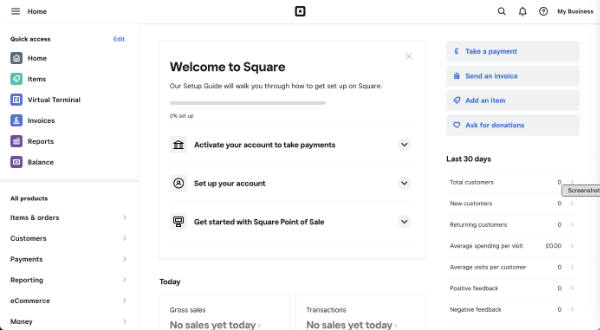
- this is the screen you are presented with when logging in - after you've found the new URL for login! There is absolutely no way you know how to transfer to the website suite - because there's no recognition of its existence on the dashboard!!
The appalling Weebly to Square Transition Documentation
The transition documentation is essentially totally non-existent - in terms of what is commonly understood as best practice.
I doubt very much if they tested any of it with existing Weebly account holders.
You are referred to Weebly and Square FAQ (which is a Weebly Document)
When you create a Square Account (from the button in the notice email) you get access to documents associated with Square (i.e. General Terms of Service, Payment Terms and Privacy Notice you get when you set up your new Square login)
By creating a Square login, nothing will change with your existing website. For more information, please read here.This link takes you to back to the document identified above - which does NOT provide a step by step transition process
Then in tiny type at the top of this document you notice it says
If you're a Weebly user being prompted to change your login to Square, review our Weebly and Square FAQ article in our Square Support Center for the most up-to-date information.The difference is this document sits within the Square Support Service - even if it is not recognised by the search facility for support!!!
It's titled Weebly and Square FAQs and states in one of the FAQs
I don’t have a Square account. How do I set one up?This highlights another document - which similarly does NOT provide a step by step process for those confused by the very poor communication for this transition process
Creating your Square account should only take about 5 minutes. As a Weebly customer, you’ll receive an email asking you to update to a Square account. Use the link in the email to get started. You can also start this process from your Weebly dashboard via a button in the announcement banner.
Once your Square account is created, you’ll log in from squareup.com using your Square email address. This means that you’ll have one login to manage everything related to your website and accepting payments online.
Check out our switching to Square Online FAQs for more information on accessing and managing your sites in your Square account
Switch to Square Online from Weebly FAQs starts by marketing Square - which is wholly irrelevant at this stage!!
People just need to know- how to set up a Square account correctly to link with their existing website - and
- to understand very clearly what are the implications of different options offeredIt does NOT address this in a simple and easy to read fashion.
What effect will this merger have on my Weebly account?
As part of our merger with Square, we ask that you replace your Weebly account with a Square account. You’ll use the Square account to sign in going forward, and all Weebly logos and branding will be replaced with Square branding
This note also states
Once your Weebly and Square accounts are linked, you’ll log in to your account from squareup.com using your Square email address. This means that you’ll have one login to manage everything related to your website and accepting payments online.
Finally they indicate what the url is for the login!!!
But - to come full circle - this is where I came in - this URL only provides access to the Square Dashboard and no way of accessing my websites!
The Square Support Page generates NOTHING about the transition for Weebly website owners (that's several million people!)
Plus if you type in "Transition" you get nothing. Major mistake!
It's an all-round COMPLETE SHAMBLES! (I speak as one who used to implement new IT systems and understand full well the importance of the documentation which accompanies the transition)
