Monday, March 09, 2020

How to watch heats of Portrait Artist of the Year 2021

The Heats of Sky Arts Portrait Artist of the Year 2021 are being held at Battersea Arts Centre starting later this month. 

How to watch the Heats of Portrait Artist of the Year 2021


You can attend and watch the Heats of Portrait Artist of the Year 2021 being filmed. That's 
  • 8 televised Heats 
  • 24 celebrity sitters
  • 72 professional and amateur portrait artists
Dates: 24th March - 2nd April 2020 (weekdays only) i.e. 
  • Heat 1 – Tuesday 24th March 2020 
  • Heat 2 – Wednesday 25th March 2020 
  • Heat 3 - Thursday 26th March 2020 
  • Heat 4 – Friday 27th March 2020 
  • Heat 5 – Monday 30th March 2020 
  • Heat 6 – Tuesday 31st March 2020 
  • Heat 7 - Wednesday 1st April 2020 
  • Heat 8 - Thursday 2nd April 2020
Hours: Doors open to the public from 9am
Admission: FREE and all are welcome. (Including step free access and an accessible toilet)

More details can be found on the Battersea Arts Centre website.
Important informationBy attending these events you give full consent for yourself, and any children who may accompany you, to be shown in the final broadcast.Please note that unfortunately there is no facility to accommodate large bags in the hall and no cloakroom facilities.


Some tips for those attending

  • There is nowhere to hang a coat - so think carefully about what to wear, especially if there is a big difference between temperatures inside and outside!
  • You cannot bring large bags or buggies into the Hall (see image below for exactly what is prohibited)
  • The artists paint for 4 hours maximum over a six hour day - so if planning to be there all day, nothing will be happening for quite a bit of the time. I'd recommend coming for a morning or an afternoon unless you are a big fan of the programme and you want the whole experience!
  • There is a LOT of standing around - all day. 
  • Most people come and go. You've got to be pretty dedicated - or friends and/or family - to stay all day. 
  • Kids are allowed in the building but there is no creche, no buggy facilities and they are filming a TV programme! The expectation seems to be that parents will be sensible and kids will be kept under control at all times (i.e. it's not a playspace). Parents who brought kids made sure they had drawing kit to keep them occupied and quiet - which seemed to work.
  • It's pretty crowded in the middle of the day - and less so either end.  Moving around can become a bit of an obstacle course at times - and you have to be alert when navigating groups of people, cameras and their operators and kids sprawled on the floor drawing the sitter!
  • There is a cafe near the front of the building but everybody heads for it at the same time so 
    • either long queues for food and drink 
    • or get fed and watered outside the official lunch break
    • or bring your own (there are numerous places to buy food and drink between station and BAC - plus a supermarket around the corner)
  • You can stay to find out who gets shortlisted. It's a very long filming day and it tends to be down to family and friends after that....


How to get to Battersea Arts centre


This Google Map shows you the location
PLUS this is BAC definition of how to get to it.

You can use the Google Map to estimate the length of time from your start point to the centre. Select the Directions arrow and input your start point and choose the mode of travel.


BY TRAIN - Battersea Arts Centre is 7 minute walk from Clapham Junction station. There are direct trains from Waterloo and Victoria, and Clapham Junction is on the Overground route from East London. 
BY TUBE - The closest Underground stations to Battersea Arts Centre are Clapham Common (Northern line) and Stockwell (Victoria line) These stations are approximately a 15-20 minute bus journey away. The 345 bus departs from outside both stations and stops outside Battersea Arts Centre. 
BY BUS - Routes 345, 77, 87 and 156 stop on Lavender Hill outside Battersea Arts Centre. 
BY BIKE - You'll find bike racks in front of our building, and you can plan your cycle route using TFL Journey Planner
Most roads around Battersea Arts Centre have residential and restricted parking between the hours of 8am and 6:30pm, Monday to Saturday.

I recommend that those chosen as portrait artists - and those visiting the Heats to watch - all allow PLENTY of time to get there. 
  • There's a Premier Inn and a Travel Lodge nearby offering economical overnight stays
  • Artists may also want to invest in something on wheels to move their kit!

Sunday, March 08, 2020

Review: Episode 6 of Portrait Artist of the Year 2020

Regular readers of my reviews of the Portrait Artist of the Year 2020 episodes on Sky Arts will have realised that I've had a recent hiatus due to technological problems and
  • the need to try and fix the old iMac, 
  • then go out and buy a new iMac, 
  • then go out again and buy a thunderbolt adapter so I can upload old files to new iMac
  • then collapse in a heap after I've got through all the stresspoints!
So this week we're going to have a Portrait Sitter of the Year overload.
I've not even watched Episode 7 yet as I didn't want to get confused when writing reviews!

Episode 6: The Artists, Self Portraits and Sitters


Episode 6 was an interesting one for me because I remembered straight off who won - because I saw the artist in the semi-final and remembered the portrait painting too. 

It was interesting to see if I'd arrive at the same conclusion while watching the progress from self-portrait to development of the portrait of the sitter.

As always links to the artist's website (if they have one) are embedded in their names.  Plus I include links to their social media sites - but only if they've used them recently. Dead sites don't count!

You can see videos of their Heat Portraits on https://www.skyartsartistoftheyear.tv/portrait-profiles/ (Episode 6)

The artists in Episode 6

Professional Artists


This episode had 7 professional artists
  • Christobel Blackburn (Instagram) - an artist who studies and specialises in the human form. Degree in Classics at Newcastle University followed by studying portraiture in Florence and completing a further two years at the London Atelier of Representational Art. Her style is pared down and minimalist. This is her self-portrait
  • Leo Crane (Facebook, Twitter, Instagram) - an award-winning animator, painter and co-Founder of creative studio Figuration. graduated with an MA (Distinction) in 3D Computer Animation from Bournemouth University. Has created animations for cultural institutions across the UK, from The Hepworth Wakefield to Dulwich Picture Gallery. He has been selected for festivals across the world for his animated films
  • Chris Eastham (Facebook, Twitter, Instagram) - Fine Art degree from Trent University, Nottingham and a PGCE in Art and Design from Reading University. Has taught art and design for many years and is currently teaching drawing and mono printmaking. Previously a wildcard contestant on Sky Landscape Artist of The Year 2019 at Fountains Abbey, North Yorkshire
  • Jacqueline Marr (Facebook, Twitter, Instagram) - Born in Falkirk and lives and works in Scotland. BA Hons, Duncan of Jordanstone College of Art & Design, Dundee University. Her work is included in the following collection: Royal Scottish Academy Archives, Edinburgh, Halifax/Bank of Scotland, The Royal Bank of Scotland and Standard Chartered Bank London and Dubai.
  • Thomas McGregor (Facebook, Twitter, Instagram) -  born in Sidcup, raised in London and the Scottish highlands and now lives and works in London. He studied at Edinburgh college of art in 1995-99
  • Lee Putman (Facebook, Twitter, Instagram) -  an illustrator who combines client work with street dance. Take a look at his sketchbook series. Started painting in oils 9 months ago. The first portrait he painted was the one for the submission and started gridding in the week prior to the heat.
  • Nick Richards (Facebook, Twitter, Instagram) - portrait artist based in London. He's just been preselected for the next New English Art Club exhibition
I'm waiting for the artist who includes the camera crew in the portrait painting......
(I used to draw the other people in the life class as well as the sitter!)


Amateur Artists


The two amateur artists were
  • Sebastian Bishop (Instagram) - painter based in Edinburgh
  • Wendy Wallis (Facebook) - Uses pyrography for portraits. I was impressed by her work - although I can understand why the Judges thought it lacked impact oompfh.

The Self Portraits


I've included comments about the submissions by the shortlisted artists under the review of both submission and heat painting. 

However I noted that each impressed at the initial evaluation - and before they'd seen much of the artists painting their sitter.  Like I have said many times before - the submission painting is critical to how well you do in the competition. It needs to be
  • a good likeness, 
  • having an individual approach is good and 
  • it MUST be consistent with what you do in the heat.


The Sitters


The Sitters for Episode 6 were:
  • Ricky Wilson - English singer-songwriter, and the frontman of five-piece band Kaiser Chiefs
  • Adrian Dunbar - an Irish actor and director who stars in Line of Duty
  • Zawe Ashton - an English actress, playwright and direct, best kjnown for Channel 4 comedy roles
Overview of Episode 6 - with Ricky Wilson in the foreground pod

Episode 6 Themes


The themes I identified were:
  • likeness of of paramount importance
  • a strong style is also important
  • portrait paintings need to have wall appeal
  • Colour grabs attention and lack of colour can reduce impact.

Saturday, March 07, 2020

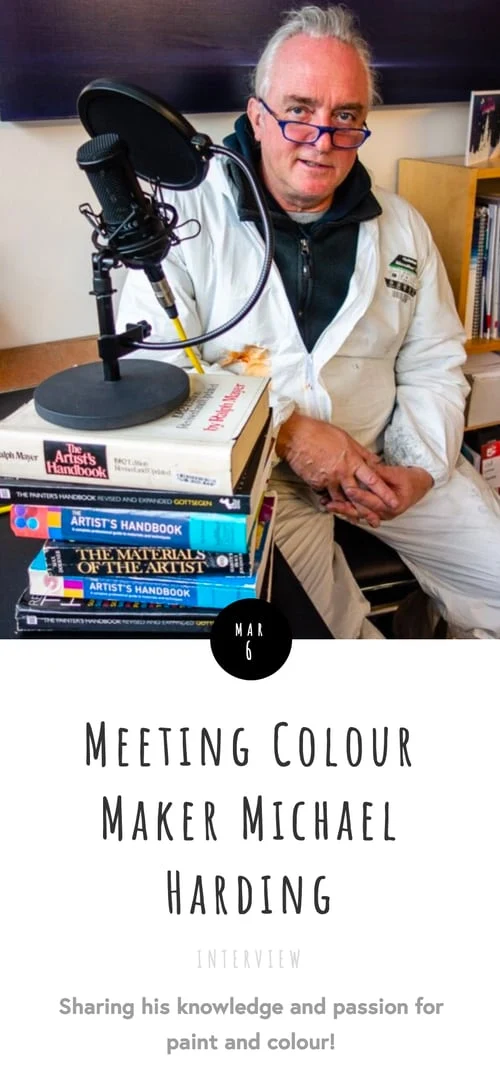
PODCAST: Ask an Artist interview with Michael Harding

I have two things to tell you if you don't already know:
  • there's a new podcast called "Ask an Artist" which is informative, intelligent and really useful. Very much a recommended subscription from me (I'm using the Apple Podcast app - here are some other ways). This is their website https://www.askanartistpodcast.com/
  • Michael Harding is making watercolour paints!!! That is of course Michael Harding of Michael Harding Paints.
How do I know this?

I listened to the Ask An Artist podcast interview Meeting Colour Maker Michael Harding published yesterday. (Find the link to to the podcast on this website page - but this is the Apple Podcasts link to the actual podcast)

https://www.askanartistpodcast.com/home/michael-harding-interview
Michael Harding Paints have a reputation of being the best in the world and in this conversation you will discover what drives Michael's successful business and why he is so passionate about paint!
The interview covers:
  • his story as a colour maker over the last 40 years
  • masses of information about the practicalities and technical aspects of making colour and oil paint and other products he makes
  • the news that he is now making watercolour paints!  
I have to say I scoured his website in the middle of the podcast looking for information about the watercolour paints and there's nothing! It looks as if he's at beta testing stage with artists he works with and that he is maybe going to say something more about them soon - hopefully.

I learned a lot listening to the podcast - and I'm sure you will too!

About Ask an Artist


Here's some basic facts about the Ask an Artist Podcast.
  • it's run by landscape printmaker Laura Boswell and portrait painter Peter Keegan
  • it started in November 2019 and to date has produced 21 podcasts. 
  • It's obvious to me that they're very well organised because the visit which produced the Michael Harding podcast took place in mid-December 2019!
  • the strapline is "run by artists for artists" and the evidence from episodes I've listened to date suggests exactly that.
  • unlike some artist podcasts this one has a minimal front end promoting the podcast and artists and maximum content on the topic it's focusing on - which makes it so much more accessible and informative - and verylikely to generate repeat listening to future episodes.
  • each episode also has a decent page which details what's covered by the podcast
  • this is how to listen
  • it' a joy to listen to intelligent artists asking really good questions of well-informed people. I'm positive that most artists will find something that interests them and will end up subscribing to future podcasts.
  • you can also follow Ask the Artist on:
Here's an image of the Laura and Peter who run Ask and Artist - reviewing paint samples with Michael Harding in his colour mill.


Friday, March 06, 2020

Coronavirus & Art #1: Risk Management for Artists & Art Events

"By failing to prepare, you are preparing to fail”

It strikes me now is a good time for artists, art teachers, art societies, art organisations as well as art galleries and museums to start thinking through the impact of the Coronavirus (Covid 19) in terms of
  • what are the practical implications 
  • what are the potential risks
  • what mitigating action can be taken.
This is after noting this morning that:
  • art galleries and museums are changing practices
  • art fairs are taking action
  • arts organisations are providing advice
Plus remembering that:
  • not everybody is equipped with the knowledge of how best to prepare and plan for risky situations
  • some might be inclined to snooze at this stage - and then have a really horrible shock later in the year as the impact of the virus hits. 
Don't be one of those who'll be saying "I never thought that......"
    Are you currently sleeping on the job?

    Risk Management for Artists


    I created a Risk Management Resource for Artists for artists some years ago - based on my training in risk management for work.You can find this resource on my Art Business Info for Artists website (in the section on PRACTICE / Office Practices)

    The first half of the first page of "Managing Business Risks" (Version 2)
    This FREE 5 page guide:
    • outlines risk assessment and risk management processes that enable you as an artist to reduce and better manage risks to your art business
    • enables an artist to get a much better appreciation of the relative importance and priority of the different risks you are exposed to and how these might be tackled.
    RISK ASSESSMENT
    • Identify all the risks you’re running
    • Identify their relative level of importance
    • Analyse the probability of the risk actually occurring
    RISK MANAGEMENT
    • Rank the likelihood and importance of different risks to determine priorities
    • Devise a plan to reduce the likelihood of all major risks occurring

    What's Happening


    Art Galleries and Museums are Changing Practices

    Wednesday, March 04, 2020

    Adobe "on the rocks" of Apple macOS Catalina

    Yesterday I got a brand new 27" iMac with a 5K Retina screen (because my old one died last week). This morning I set it up including upgrading to macOS Catalina which, as you may be aware, is a 64 bit application which does not work with 32 bit applications.


    Which is when I found out that Adobe is obviously not equipped or staffed to cope with a very well signalled Apple upgrade to 64bit apps - and six months after Catalina was released has still not resolved the problems.

    Bottom line Photoshop Elements - which I have been using since version 3 some 15+ years ago - is INCOMPATIBLE with Catalina!

    I could not believe it when I read the following....
    Adobe does not recommend that customers using old versions of Photoshop upgrade to macOS Catalina.


    Incompatible versions (version 19.x and earlier) will not display in the ‘Older Versions’ list within the Creative Cloud desktop app.


    Older versions use 32-bit licensing components and installers. Therefore, they cannot be installed and activated after upgrading to macOS Catalina. Upgrading to macOS Catalina with an older version already installed on your computer may allow the application to function in some capacity; however, you will not be able to reinstall or activate the application after the macOS upgrade.

    from the Adobe website - Photoshop and macOS Catalina (10.15) known compatibility issues

    This was somewhat galling to say the least given that 11 months ago, on 31st March 2019, I purchased Adobe Photoshop 19 from Amazon and installed via my Adobe Account - and in less than a year it is now UNUSABLE as it will not download to my new computer without problems.


    Reinstalling does not work. That's because the installer works with a 32 bit system!!!!!

    Adobe needs to get to grips with the fact that not everybody has the scope to wait around for ages while they work out to make their software work properly!

    At first I thought I was going to have to shell out for PS Elements 2020 - but then I read the problems that version of the software has with Catalina.
    Photoshop 21.0 & Photoshop 20.0.7 work with macOS 10.15 (Catalina) but have these known compatibility issues. You may want to remain on your current version of macOS until these issues have been resolved.
    So basically Adobe is very definitely losing customers to alternative products. I'm absolutely certain I'm not the only one who has experienced problems just by the quantity of info I found online after running into this problem.

    Pixelmator Pro - the cheaper alternative to Photoshop Elements


    I've just downloaded Pixelmator Pro - which is fully compatible with Catalina macOS - from the Mac App Store - and paid less than half the price of PS Elements!


    VIEW FULL SIZE Pixelmator Pro on Mac App Store

    So far it seems to work - although it will take a little bit of getting used to after 15+ years of Photoshop Elements!

    Guess who won't be taking out any sort of subscription to Adobe in the foreseeable future!