Showing posts with label pastelsandpencils. Show all posts

Tuesday, July 30, 2013

Liz Steel is in London and sketching High Tea!

Sketching High Tea at Fortnum & Masons - 3 hours after we started.....
I was 'missing in action' yesterday because "the famous Liz Steel" (Liz and Borromini; Sketching Architecture) arrived in London and together we visited the 245th Summer Exhibition at the Royal Academy of Arts. (See 10 reasons to visit the RA Summer Exhibition 2013).

Followed by a walk across the road to the 4th floor of Fortnum & Mason in Piccadilly and High Tea in the Diamond Jubilee Tea Salon.

Liz and I arrived at 4.15pm and we left nearly 5 hours later - such a lot of catching up, talking and sketching with my fellow Urban Sketcher!

This is the scene at 7.30pm. I'm sketching in Coloured Pencils and Liz is painting in watercolour (in her 4th sketchbook of her trip!).  At this stage we've both eaten a savoury starter and our cream tea and sketched the patisserie twice and eaten none of them.  One more cake and one more sketch to go!

Right click the photo and open in a new tab to see a much bigger image of our unfinished sketches.

You can see:
You can also see more sketches of Liz's trip to Europe and photos of her participation in the Urban Sketchers Symposium in Barcelona on her Flickr Photostream.

Note:  We had a big giggle about the number of times she's now heard the term "the famous Liz Steel" in introductions or responses from people on first meeting her.  It's truly amazing how sketching can change your life - and international status! :)

Saturday, June 01, 2013

POLL: How do you list your exhibitions on a CV or website?

Part of the Exhibitions Page on my Portfolio website - Pastels and Pencils
This morning I discovered that I'd completely forgotten to update the Exhibitions page on my website since last year - and I hate out of date websites!

So I had to find a way of bringing it up to date and make it look interesting despite the fact I have no planned exhibitions at the moment because, prior to my recent surgery, I was finding it too difficult to produce.

I'm not very fond of long boring lists of exhibitions  and always try to introduce a few images - hence the above solution for part of my new Exhibitions web-page while I get round to contemplating what I might now be able to do in the rest of this year.

Revising the page got me thinking about the different options for listing exhibitions on your website and in your CV / Resume.

Which is why this month's Making a Mark Poll is all about exhibition listings!

It's a very basic topic - however there are a few options for how best to list exhibitions given that they tend to vary between:

  • type: solo or group 
  • type: art society or art gallery or charity or collaborative project  etc
  • date: recent or first exhibited
  • venue

POLL: How do you list your exhibitions on CV or website?


This month's Making A Mark Poll asks How do you list your exhibitions on CV or website?

The poll provides for multiple responses and the options are:
  • always most recent exhibition first
  • always oldest exhibition first 
  • always include title of exhibition
  • always include year of exhibition
  • every solo exhibition - date order
  • every solo exhibition - group by type / venue / date 
  • all group exhibitions - date order
  • all group exhibitions - group by type / venue / date
  • all solo & major group exhibitions only 
  • select list of both solo and group exhibitions
I'd also be interested to hear the reasons why people choose the options they use.  I know I have changed how I list mine over time - mostly with a view to making the differences between the different exhibitions more explicit and to reflect which have grown or diminished in their importance to me.

You can find the poll in the right hand column.  It finishes vert early on 30th June and the results will be reported soon after that.

Note re Making A Mark Poll in May

Last month's poll went awry.  The poll started losing votes for no apparent reason and my experience of Blogger polls is that they often don't correct quickly when the software gets out of whack.  So I pulled the poll and will try it again at a later date.

This month I'm using Polldaddy software which I normally only use for the Making A Mark Awards - however I'm using it in the side column - so we'll see what happens!

Links to Resources for Artists

If you need help thinking about how you communicate about yourself, your art and your exhibitions, you might like to take a look at my websites about creating and artist's statement and a resume or CV.

How to write an Artist's Statement - Resources for Artists
An Artist's Statement is essential - but lots of artists dread writing a statement about their art! DO YOU NEED HELP? Do you need a statement for an art competition, an exhibition catalogue, a grant proposal or a website - but not know how to express your art in words?


How to write an Artist's Resume or CV
How do you summarise your life as an artist in a CV or resume for galleries, exhibitions and potential employment? Do you understand the difference between an artist's CV, artist resume and a bio - and how to write them? 

Thursday, March 12, 2009

Change of dates for Pastel Society Annual Exhibition 2009

Orange Grove Chios (1995)
19.5" x 24.5", pastel

copyright Katherine Tyrrell

The Pastel Society has changed the date of its Annual Exhibition for 2009. This year the Annual Open Exhibition will take place between 10th and 21st June at the Mall Galleries with the Private View being on the 9th June. Their aim is to present a vibrant exhibition of paintings and drawings which reflect the extremely diverse nature of the use of the pastel medium by artists working today. I'm expecting it will also include a tribute to Mark Leach, the President Elect who sadly died in June 2008.

The annual exhibition is open and consequently features works by both members and non members. The annual exhibition of the Pastel Society is always special for me because this was the very first national art society which accepted work from me into their annual exhibition - all the way back in 1995!

"Orange Grove - Chios" was completed in a couple of hours while I sat in the orange grove of a fomer Venetian merchants house on Chios in Greece!

Eligible works
  • Acceptable media are: Pastels - including Oil Pastels, Charcoal, Pencil, Conte, Sanguine, or any dry media.
  • All works must be framed but metal and clip frames are inadmissable
  • A maximum of six works may be submitted, of which a maximum of four may be accepted.
  • All works should be for sale. The minimum price for works is £300
  • up to 6 works can be submitted of which up to 4 will be chosen
Submission: key dates and points to note
  • The submission fee is £10 per work, with no further hanging fee.
  • Artists are invited to submit work for consideration on Friday 3rd April and Saturday 4th April 2009, from 10am to 5pm.
  • Works which are taller than 2.4m (8 feet) are cannot be received on the normal admission day. Contact the FBA for further details
  • Collection of unaccepted work: Friday 17th April - Saturday 18th April 2009 (10am-5pm)
  • Collection of unsold exhibition work: Thursday 25th June 2009 (10am-5pm)
Events: The annual exhibition always has a number of associated events. There's usually a a demonstration evening during which members of the society demonstrate their different approaches to the medium and answer questions posed by visitors. A series of workshops will be tutored by members of the Society on a variety of subjects. Dates will be listed soon. £45 a day, or £40 a day if booking all four. For full details please send a large SAE to Federation of British Artists, 17 Carlton House Terrace, London SW1Y 5BD.

Prizes: The Pastel Society has a long established tradition of sponsorship for a number of prizes - a number of which are sponsored by galleries who exhibit pastel artists. You can find out more details about these on the Pastel Society website page about the exhibition.
_____________________

You can see more drawings of trees on my website - Drawings of Trees and Leaves by Katherine Tyrrell. I did fewer sketches back in 1995 - having just graduated to completing pastels on full sized sheets of Rembrandt boards which are 19.5" x 24.5". I remember coming home from Chios with a large suitcase with an awful lot of very large pastels - like this one, this one and this one - clamped between foam core in the bottom! However you can see a little bit more of the island of Chios in my travels with a sketchbook page about Greece

Links:

Thursday, March 05, 2009

Exhibition review: Wapping Group of Artists - 63rd Annual Exhibition

An overview of part of the East Gallery (top) and the contents of the display cabinet (bottom)
photos copyright Katherine Tyrrell

Yesterday I visited the Mall Galleries to see the annual exhibition by the Wapping Group of Artists.
The Wapping Group was formally founded in1946 and initially met to record the busy life of London's dockland. Since then, the range of locations has widened in response to the changes of The Thames – on any Wednesday between April and September members of the Group may now be found in any weather at a rendezvous anywhere from inland Henley and out to The Estuary. This companionable band of just 25 dedicated and capable painters maintains the original Group aims of fellowship and enthusiastic recording and interpretation of the River.
Wapping group website
The artists show 4 paintings each and all the paintings are of the river and/or places near to the river. I particularly liked the way the exhibition had been hung. The emphasis is very much on plein air paintings. Here are some of the places I saw in the titles of paintings: Marlow, Isleworth, Twickenham, Tollesbury, Custom House, Greenwich, Bugsbys Reach, Maldon, Medway, Faversham, St Osyth.
...the Group is proud to have remained exactly what it first set out to be: a small group of fellow-artists, appreciating each other's company while painting outdoors together in all weathers.

Almost incidentally, it has recorded the changing face of London and the river Thames for over sixty years.

The group includes renowned marine artists such as Trevor Chamberlain ROI, RSMA (who is a past President and organises the programme of outings) and Bert Wright PPRSMA, FRSA (the current President).

My personal preference is for the watercolours of Paul Banning RO, RSMA, AROI, although yesterday I was very impressed with the watercolours of Alan Runagell RSMA. You can see examples of their below.


Four paintings by (top) Paul Banning and (bottom) Alan Runagell

You can find out more about the history of the group from its website or the book which was produced to celebrate reaching 60!

a selection of paintings by members of the Wapping group of Artists

The exhibition is being held in the East Gallery of the Mall Galleries. It opened with a Private View on Sunday and closes at 4pm on Saturday 7th March. Details of further exhibitions later in the year are available on the website.

I avoid the Private View having been to one before. The reason why is a compliment really - because this group really knows how to look after its mailing list and collectors and has a loyal fan base and their PV is always completely packed out. This year it did well as usual and 16 pictures sold at the PV (and more since).

Many thanks to David Penny who is the principal organiser of the exhibition and wh0 gave me permission to photograph the exhibition over the phone while I was sat with my mobile phone in the Mall Galleries! Plus thanks to Alan Runagell for helping me out with queries.

Membership

For anybody who is interested people can apply to become candidates for membership by submitting work for assessment followed by a season painting with the Group before further consideration and election to full membership.

More to come

I actually saw three other exhibitions yesterday as well - of which more later!

Friday, August 15, 2008

I've been juried into the UKCPS Annual International Exhibition

Potential
8" x 10", coloured pencils on Arches HP
all images copyright Katherine Tyrrell

"Potential" has been juried into the 7th Annual International Exhibition 2008 of the United Kingdon Coloured Pencil Society (UKCPS) which is to be held at 'The New Gallery' at The Royal West of England Academy, Queens Road, Clifton, Bristol, BS8 1PX, from Friday 3rd to Tuesday 28th October 2008.

The aim of the exhibition is to feature around 60 examples of the best coloured pencil work from around the world. Bob Ebdon reported on the UKCPS blog recently that the Executive was very pleased with the entries for this year's Exhibition.
  • the total number of artists entering work has increased by almost 50% more artists
  • the international dimension has expanded with entries being received from artists in 11 countries, and
  • the total number of entries are 30% up on last year.
UKCPS, unlike CPSA, has a policy of having a team of three jurors who each see the juried entries individually. Typically they are a coloured pencil expert, a representative of the sponsor (which is always a coloured pencil manufacturer) and a respected artist from the local area.

This year Janie Gildow CPSA led a team of three jurors who included a representative of Faber Castell, this year's sponsor, and another from the Royal West of Academy. I'm particularly pleased as Janie provided early stimulus for my coloured pencil artwork as she's the author of two standard reference books on the use of coloured pencils which I bought very early on. These books are Colored Pencil Explorations and Colored Pencil Solution Book (with Barbara Benedetti Newton)

Bob outlined some background to Janie Gildow's perspective on "What is good art?" in his post on the UKCPS blog on when he quoted the following
Good art is a result of careful planning, creative expression, strong composition, excellent craftsmanship, and a confident and complete exploration of the medium.
Janie Gildow
As it happens Potential is a work which I featured on this blog as a work in progress last year in this post Potentially Peonies. You can see how I built it up from a pencil outline - which gets rubbed away as I progress across the piece - through the various stages to the final version.

You can see more of my original fine art drawings of flowers and plants - in coloured pencil (large and small) and pen and ink on my website. You can read more about my passion for drawing flowers and my flowers in art project last year in Flowers in Art - Resources for Artists.

Note: A fine art print of this work is available via Imagekind who happen to have a 25% discount on custom framing until 10pm PDT on 18th August (discount code PLUNGE25)

Links:

Wednesday, August 06, 2008

Lines and Colors and a rather nice surprise

I've just broken off from prep work for an exhibition to find an email containing some totally unexpected and very nice news. Charley Parker (Lines and Colors) has rather surprised me by writing a very complementary piece about me on his admirable blog - see Katherine Tyrrell.

I'm a huge fan of 'Lines and Colors' and am always really interested to read about the various artists that he writes about. We share a number of artistic interests and it's always great to find that he's posted about yet another new artist that appeals to me - especially when I know that every post will come with a bunch of helpful links to sources of images and information on the net. I'm sometimes able to suggest an extra site as a reference source or a 'must see' exhibition.

A lot of people comment that they don't know how I manage to find the time to do what I do. I have a confession. I'm always in awe of the way that Charley can produce a class article day after day - all of which are well researched, thoughtful, insightful and well written! It just so happens that today I'm the subject!

I particularly liked this comment - picture me with a big beaming smile at this point!
I like the range of colors she finds in surfaces that are ostensibly white, whether in the walls of buildings or simple still life subjects like eggs in a bowl or fruit on a white surface.
You can find the images he used in the Houses and Gardens gallery on my website.

Now I return to matting and framing for an exhibition...........

Wednesday, February 27, 2008

Advice on Sketching - tips, techniques and toolkits


Perrot - the first sketch on the Sunday morning
pen and sepia ink across a double page spread of my A4 Daler Rowney sketchbook

copyright Katherine Tyrrell

I've reviewed and updated the page on my website, Pastels and Pencils, which provides Advice about Sketching.

Sketching: Information about Tips, Techniques and Toolkits

The page provides information for all of you who would like to try to develop and/or improve your skills in sketching. It provides

  • links to a collection of my advice on approaches to sketching and sketching toolkits
  • plus Word files for FREE DOWNLOAD for personal and educational use only.
  • plus links to relevant sites which I've developed as part of my Resources for Artists series of information sites.

It's organised as follows:

  1. Starting to Sketch with Coloured Pencils
  2. Travels with a Sketchbook - tips and techniques
  3. Advice on Sketching Toolkits and Materials
  4. Sketching for Real - a class with assignments
  5. From sketch to painting - a slideshow of a work in progress
  6. More information about sketching and travels with a sketchbook
I've not finished! I'll be adding more in the future - so those who would like to know when this happens need to read the next bit too.

Sketching: The Mailing List

This page is just over a year old and is already a popular part of my website. It also contains a lot of information. In order to make sure people who are interested can easily keep up to date with any changes to this page I've added a mailing list so you can get an update every time I add something major.

So - if you would like to know when new items are added to the 'Advice on Sketching' page please join the mailing list by adding your e-mail into the box near the top of the page.

Otherwise, maybe bookmark the page if you'd like to look in more detail later - there's a lot to look at! Regular readers of this blog and my Travels with a Sketchbook blog over the last two years will have seen a lot of it already - but not all in one place....

From sketch to painting - a slideshow of a work in progress

I've added in a new section which is not new material but because I've been rejigging the main menu, access to this material has been moved here as it fits much better with the rest of the advice about sketching.

Perrot - afternoon colour study
coloured pencil on Canson Mi Teintes

copyright Katherine Tyrrell

It relates to page which describes, with a slideshow, how a pen and ink drawing and a coloured pencil study of an old Perigordian farmhouse in France are worked up into a finished coloured pencil drawing. You can see small images in this blog post.

I'm thinking of developing this into a publication (a bit like the one I did introducing people to life class -
A Making A Mark Guide: Life Drawing and Life Class). Let me know if you think that would be a good idea. I don't want to do one of those 'I used these coloured pencils....' pieces. This would be more about the total process and how it was developed in more detail.

After all, the pencils will always vary whereas the process endures!


Perrot - a work in progress (Stages 1-4)
coloured pencil on Arches HP,
60cm x 42cm (c.23.5" x 16.5")
copyright Katherine Tyrrell

Links:

Tuesday, February 26, 2008

Keywords, site descriptions and meta tags - how search engines find your website and content

I'm currently updating the keywords for the pages and galleries on my website - Pastels and Pencils. When I originally set it up, the Sitekreator webware which I use only allowed one site description and one list of keywords for meta tags. At the moment Google Webmaster tools tells me that its bot keeps finding duplicate page descriptions - surprise, surprise!

I discovered recently that I can now vary the description for each page and tailor the keywords to each page. So that's what I'm now engaged in doing. However I decided to check out which were the best keywords for each page. This post (and the next one) is about that process - so if you are not an expert and want to know a bit more about keywords, meta tags and site descriptions you may well find something interesting in what follows.

My expertise: 'advanced' novice status!

I was a TOTAL novice when I started out - strictly amateur but keen to learn. I'd heard about keywords and meta tags and 'knew' they were important so I tried to learn a bit more as I set the site up. I'd really only classify myself as an advanced novice now but find that I often encounter people who know much less than me even though quite a lot of the basics is really not difficult. So what follows is my strictly non-techie understanding of and approach to keywords, meta tags and site descriptions.

I hasten to add that I only work with one form of webware, don't do the html bit on home-coded websites or advise on how to do things with other types of webware - and I only point you in the direction of where you will find tutorials or sites which are more reliable sources than me! This, as you will appreciate, is my 'get out' in case you crash your website!

Now - I don't mind experts using the comments function to correct anything I have said or to add in further comments - that's how we can all learn - with one proviso! You MUST try and use strictly non-techie language. If you must use jargon, then you MUST also explain what it means in layman's terms first.

What are keywords and meta tags?
Meta keywords
On the web, a keyword is a reference to the content and/or the type of meta element included in a given web page's HTML code to aid in the page's indexing. A keyword meta element may include several comma-separated keywords (or keyword phrases, each of which may contain several individual words)
Wikipedia: Keywords

Think of a keyword as being a bit like a signpost. Here's a very simple analogy (it's actually a lot more complicated than this). You're driving along the information superhighway and you want to find the turn-off for 'art' - well you need to be able to see a signpost for art. Then you're moving down the art highway and now want to find some landscape paintings of the Lake District in England. So you probably wait until you see 'landscape' and/or 'painting' as a signpost and turn off and then look for the signposts for 'Lake District' and 'England'. You finally end up at a website page which should contain all the relevant keywords used in your search as content. They may also be used in code as meta tags.

Unfortunately that means that all those pages which were only described in a very basic or generic way or were not labelled or described at all are probably not going to be found very easily.

There's also a twist in the tale of keywords as meta tags which not everybody is familiar with. Keywords were abused very badly by people trying to improve the profile of their web pages. Their sites would be loaded with 'heavy duty' keywords as meta tags and the search engines would be fooled and the results of searches started to become a complete nonsense.

The keywords attribute was popularized by search engines such as Infoseek and AltaVista in 1995, and its popularity quickly grew until it became one of the most commonly used meta elements[1]. By late 1997, however, search engine providers realized that information stored in meta elements, especially the keyword attribute, was often unreliable and misleading, and at worst, used to draw users into spam sites. (Unscrupulous webmasters could easily place false keywords into their meta elements in order to draw people to their site.)
Wikipedia - meta elements - they keyword attribute

People speculate about what now happens. The best guess is that meta tags probably still 'count' but that Google started to check meta tag keywords against the text content of the page. The tools they now use to check pages are becoming ever more sophisticated. My own personal 'rule of thumb' is as follows
(Experts - please note this my layman's shorthand version!):
  • If the tags, page title and page description seemed to reflect the page content then Google will be happy.
  • If the words and language are of a good standard and fit with the rest of the site then Google will be happy
  • If they don't reflect content and/or exhibit poor language structure then Google won't be happy - and might keep that page low in the index if indeed it gets indexed at all.
  • If there are very few words on a page then Google gets confused - which probably means getting a good Google ranking is difficult if not impossible.
What now follows is a brief overview of how a search engine works and how it looks at my website - and yours.

How a search engine works

Wordtracker.com provides a useful overview of how a search engine works in basic terms.
  • the spider bots 'crawl' the internet and find new pages. Spider 'bots' look for text, links and the URL. They ignore all images and formatting. They return periodically and review for changes - particularly if you have a site map loaded. (I've now got sitemaps for my website and both blogs loaded.)
  • the index software works as follows

The Index software catches everything the Spider can throw at it....The index makes sense of the mass of text, links and URLs using what is called an algorithm - a complex mathematical formula that indexes the words, the pairs of words and so on.

Essentially, an algorithm analyses the pages and links for word combinations and assigns scores that allow the search engine to judge how important the page (and URL) might be to the person that is searching.

Wordtracker.com: Keyword Basics Part 1: How Search Engines Work

  • the front end of the search engine uses query software. You or I type in the words for our search and the software then reviews all the information stored in its index (ie The search engine doesn't search the internet - it looks at what it's already got collected by the spiders and analysed by the index software. That's why sites won't appear in response to a searche until they have been crawled and indexed)
Site Description

I found out that the site description is that little bit you see underneath a site heading when it comes up in a list in Google. The description for a page is one the things that some bots look at. This is what wikipedia has to say about site descriptions - note citations are required for some of it.
Unlike the keyword attribute, the description attribute is supported by most major search engines, like Yahoo and Live Search, while Google will fall back on this tag when information about the page itself is requested (e.g. using the related: query). The description attribute provides a concise explanation of a web page's content. This allows the webpage authors to give a more meaningful description for listings than might be displayed if the search engine was unable to automatically create its own description based on the page content. The description is often, but not always, displayed on search engine results pages, so it can impact click-through rates. Industry commentators have suggested that major search engines also consider keywords located in the description attribute when ranking pages.[4] W3C doesn't specify the size of this description meta tag, but almost all search engines recommend it to be shorter than 200 characters of plain text[citation needed].
Wikipedia - meta tags - the description attribute
I use the Squidoo bookmarklet tool in my Firefox browser to add in sites to my Resources for Artists information sites. This has a very nifty arrangement where just adding in a URL address for a webpage automatically identifies both the site title and the site description for that page. Except you would not believe how many web pages out there have rubbish titles and absolutely no description - or just the first bits of text which come up on the page. I'd estimate that at least half the sites I add are described in ways which are unhelpful in the extreme.

What you can see below is what my site looks like if I attempt to add it as a link to bookmark it.

Checking your meta tags for title, site description and keywords

You can also check out how any page on the internet is described i terms of its meta tags by going to View/Page Source while viewing the page in question. Another page pops up and that gives you the visible coding for the page you are viewing. (Some sites seem to obscure this but I've found you can see quite a lot for most pages).

Go and check it with your own website right now. Now you see that bit where it says meta tags right near the top check out what it says for
  • title
  • meta name ="keywords"
  • meta name ="description"
....because that's how your site is described in search engines. (I've left out the <> )

You can see the top of the "page source" view for my own website at the top of this page - click the image to see a larger version.


Now - if your jaw is dropping at this stage just remember you have some very good company. I could name names, but I won't! ;)

Keywords / meta tags are also like 'labels' in Blogger and 'categories' in other blogs. They are the tags / signposts which help people to find a type of post. See these two posts for why labels are important when using Blogger
Which keywords?

Which keywords to use is THE BIG QUESTION. There are vast numbers of people paying other people lots and lots of money to work this out - because, as we know, keywords used as meta tags or as part of the content of your web page are the signposts are very likely to help get people to your site. So how can I (or you) compete with that?

Well you can learn quite a bit by reading around. Try reading the wikipedia page on keywords. This has a section on 'working with keywords'.
The first mistake many publishers make is to 'underdescribe' their content by using a keyword that is too general to be useful......The second mistake publishers frequently make is to not put themselves in the mind of the searcher, but to instead use keywords that are relevant to them.
Wikipedia - Keywords
When I was starting out, once I had discovered the "page source" view I started looking at well constructed artists websites - where somebody had obviously taken some care about it (I thought). I looked at how they titled their sites, how they described them and which keywords they used. I used them as a reference, they gave me an education. I also learned very fast that what looked like a super duper website on the face of it could be let down very badly by the fact that it was clear that somebody had not done the necessary work with the site description, keywords and meta tags. So that got me started.

(As an aside, what's very funny is that the Wikipedia keywords page uses itself an example and discusses what words might be best to describe that page - so I checked - and they are actually completely different!!!)

Then I discovered the fact that you can check out the popularity of different keywords - in a general sense. People often think that the number of results you get when you type a keyword into a search engine tells you how popular that keyword is. However all the search engine is doing is telling you how many pages on the Internet contain some or all of those words - it doesn't tell you how popular they are or how many people are searching on those words.

Tools exist which allow you to check the popularity and use keywords. Take a look at this page on del.icio.us - it lists all the sites which have been bookmarked and saved by people using the tag 'keywords' - and you can see how popular they are. I'm assuming popularity in this context (because del.icio.us gets used a lot by people actively wanting to look and store information) probably has some connection to how well they work. Although it might be an indication of how long they've been around - just like the early blogs captured lots of links.

Now the top one is the one used by Yahoo and is very popular and recommended by my webware - but it periodically seems have a habit of conking out as it gets overloaded due to usage.

So take a look at the next best thing - the external version of the Google Adwords tool. Google Adwords are really just keywords used for advertising and the placement of Google Ads. However, you don't need to be subscribed to Google Adwords to use the tool.

You can also use Google Trends to check out what people are searching on - but this is a tool which is much more relevant to people whose sites are very newsy and up to the minute!

The problem for artists

As you can imagine lots of images with esoteric / punter friendly titles and very little if any other text on a page might have a problem presenting enough data for the search engines spiders and index software.

So an artist's website is always going to create a problem in terms of being easily found because of the nature of the content of most pages. That's fine if you are happy that the only people who will find it are those that you personally give the website address. It's not so good if you'd like other people to find it too.

The same issue arises for those auctions and blogs which aim to to sell artwork.

How to remedy this really needs to be the subject of another post.

At the moment, I think it's
probably worth my while going through my website, reviewing my page titles, my content for keyword use and then changing all the page descriptions and keywords for each page of my website to get a better match with content.

The next post

In the next post - later this week I'm going to highlight how to find and choose keywords and how to change them on your website using the tools available - within the provisos set out above.

Links:

Monday, October 30, 2006

The best ever workshop - pastel painting with Sally Strand

Beach Lady
Unison Pastels on full sheet of Saunders Waterford watercolour NOT 140lb
copyright Katherine Tyrrell (set-up by Sally Strand)

Last month, I fulfilled a long held ambition and took a pastel workshop on "The Color of Light" with Sally Strand. The workshop was organised and hosted by the Pastel Painters' Society of Cape Cod.

Without a doubt, it was the best workshop I've ever done (in any medium) in terms of subject matter, the nature of the challenges presented and the teaching/learning process. Plus I got to see how Sally develops her own pastels - on watercolour paper - and gets her great sense of light in her paintings - which is extremely interesting! See her portfolio on her website to see what I mean

It was probably the most ambitious workshop (in terms of what was expected of the students) of any I've ever done. It was also extremely successful and Sally as a tutor was applauded by all the pastel artists who took it. Sally commented that we were a fairly advanced set of students - and as most were members of the Pastel Painters of Cape Cod and a number were professional / semi-professional artists that's maybe not so surprising. For me, it was also really wonderful to work with other people doing great work of their own.

One of the reasons for delaying this post was to sort out what I could post and do it justice. Here are some of the highlights of the workshop for me:
  • Five days of solid hard work - 9.00am to 4.30pm each day - plus lots of input from Sally as tutor - that's how I like it!
  • Sally provided six different still life set-ups - colour-co-ordinated with different shapes / volumes / types of surface and then personally set up the lighting for each. We had three in each room which meant that between 2-3 artists each had a very good view of at least one of the still life set-ups. It makes such a difference when the tutor goes to the trouble of providing a very good set of still life objects which support the tuition objectives for that day. These were the best set-ups I've ever worked on by a very long way.
  • We were also provided with four different models to draw - from life (two models, one for each room on two separate days). Again Sally paid meticulous attention to all the model set-ups and a good part of the responsibility for what workshop participants achieved is due to that level of attention. Everybody had good sight of the model and could work at an easel. I should highlight that Sally does not teach portraiture and indeed is not looking to help workshop participants develop a model's facial features - she teaches how to design and paint people in a moment of time in a setting
  • Seeing how Sally makes very extensive use of a sketchbook for developing her work - sketching / composition try-outs / practical matters
  • Sally's emphasis on the use of thumbnails to determine both design and basic value pattern. She demonstrated and then provided us all with pointers as we all tried her method. Saying this is one thing - getting advice from Sally herself made all the difference as I struggled to reduce to just three values. It's very difficult but I can now appreciate the difference it makes - and how to do it!
  • Her constant and particular emphasis on:
    • the huge importance of values when painting light
    • simplification of subject matter
    • designing a composition
    • the importance/impact of the crop
    • the placement of certain values/colours - and locating the darkest dark and the lightest light right at the start of making pastel marks
  • learning how she works with lighting - in relation to her subject matter and on her own work. She works in daylight and never shines a light on her paper as she finds it distorts her continuous assessment of values.
  • practical matters to do with working with pastels on watercolour paper. I was amazed at the impact of working with a watercolour underpainting and how much pastel I could get on my paper without it being a problem. See below for an example of Sally's initial underpainting and then first marks - and then one the later demos with a model. None are finished but you can see the impact of her approach from the start.......
    • underpainting on watercolour paper - very simple
    • first pastel marks - setting the baseline for value and colour with clear value pattern and lightest light and darkest dark indicated
    • part-completed pastels of both still life and life model - her marks are still very large and broad

Still life demo and part-completed life model - on a 1/4 sheet of watercolour paper
Set-up and all images copyright Sally Strand

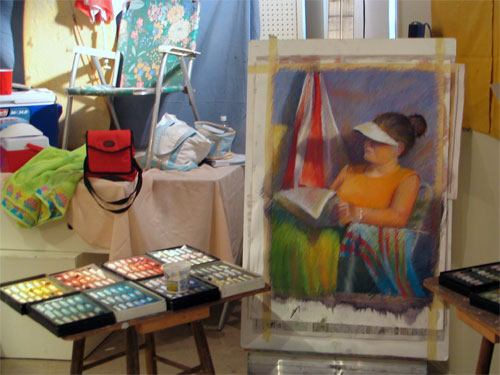
My own work is still somewhere between the USA and home so I'm having to rely on less than perfect photography to show you some of it. The image at the top is my set-up for the first model and it more or less completed. Before starting this we all worked in our sketchbooks to identify and evaluate and then develop alternative designs and crops for this subject. This is something I always do anyway - although my thumbnails are a lot bigger than most. I'd never simplified to just 3 values before though and found that a real struggle at first.

I made the mistake of going too chalky on one we worked on the last day (see below) - this one looked much better about two thirds of the way through. We also realised that my crop left the eye being drawn by the yellow t shirt and it would have been better if that had been a different colour.

Sally Strand workshop - the colour of white
Unison Pastels on Wallis paper
Copyright

I very much recommend doing a Sally Strand pastel workshop. Much of what she teaches applies to art generally rather than just the medium of pastel. Whether you are an aspiring or advanced pastel artist, if Sally ever does a workshop within scope of your own personal preparedness to travel then do try and get to it - you truly won't regret it. I've waited many years to do one and was so glad I travelled across the pond to do it.

As one fellow (semi-professional) artist put it "I've learned so much that I feel like tearing up everything I've done so far and starting again!".

The upcoming events page on Sally's website is the place to go for details of her schedule of workshops. You can also register for her newsletter which provides information about future such events and exhibitions.

Links:
Technorati tags: , , , , , , , ,